
Considering a Change in Speech Apps?



If you’re contemplating a switch in speech apps for your student or client, AbleNet is here to help you make the most suitable choice. With the QuickTalker Freestyle, SLPs have the flexibility to change the speech app at any time during the 5-year warranty period.
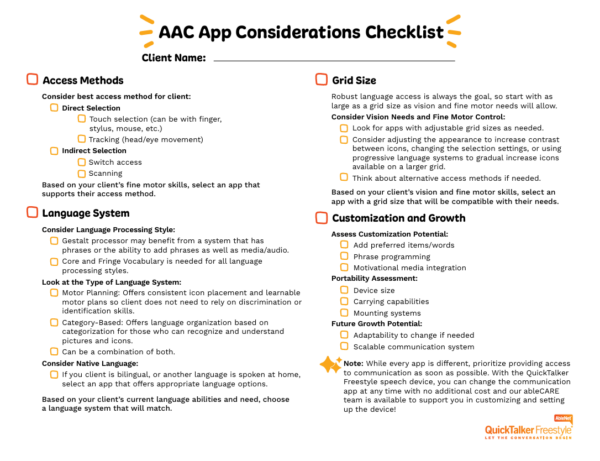
You can print out a larger checklist for AAC app considerations by downloading the checklist below. If you want a more thorough guide to picking a speech app, check out Finding a Speech App That Fits.
Assessing the Need for a Change🔗
Consider the following to determine whether your QuickTalker Freestyle user needs a change in speech apps.
Current App Experience🔗
Evaluate how well your client or student is adapting to their current app. If they have been using it for a significant period and are comfortable navigating it independently for various communication needs, a change may not be necessary. Each app has a distinct interface and learning curve, which can impact the transition process.
They may need a change if:
- After using the app for a significant period of time, the user isn’t able to independently navigate the app.
- They’re frustrated or disinterested in the app.
- Alternative access options aren’t available that would make app use more accessible.
Hiding or Masking in Speech Apps🔗
Most AAC apps allow you to hide or mask icons, which can help reduce clutter on the screen while maintaining the motor plan. This means that you can simplify the display by hiding icons temporarily, without changing their locations on the grid.
Many AAC apps offer a vocabulary builder or filter feature, and some allow you to select and hide multiple icons at once. This gives you the flexibility to adjust the display while still ensuring that the user is familiar with the system’s layout and motor plan.
Tip: Check out the Speech App Guides for more information on how to hide/edit buttons and adjust the grid!
Adding a Speech App🔗
If you believe another app might better meet the individual’s needs, consider requesting a trial of the new app alongside the current one. This approach allows your client or student to experience both options and provides valuable insights into which app aligns best with their communication goals.
If you decide to add an app, consider the following:
- Do they seem more interested in learning this new app than continuing the old one?
- Are there better grid options for your user?
- Does the user have an easier time navigating this app than the previous one?
Team Decision🔗
It is essential that all members of the device user’s team, including speech-language pathologists, teachers, and, most importantly, parents, are involved in the decision-making process when considering a change in communication apps. Changing a client’s communication tool is a significant decision that impacts their daily life and interactions.
- Can parents/caregivers model the new app for their loved one?
- What do teachers notice about app usage in their classroom?
- How can the team make the transition to a new app smooth for the user?
Use Recasting🔗
If you’re transitioning to a new app, remember that recasting language (repeating the phrase in the new app) from the previous app might be beneficial. This process can help ease the learning curve and provide models for using the new app.
You will be able to see which app your client or student shows interest or success with, which can aid in the decision making process!
- Determine core phrases to recast in the new app with the team.
- Create a plan that is shared with the team for teaching new phrases during the transition.
- Take notes on how the user responds to the recast.
Exploring Alternatives🔗
If your client or student, despite consistent modeling and ample use opportunities, still struggles with their current app, it might be time to explore other options. Our SLP Empowerment Team is here to discuss which alternative apps would be most effective for your client.
However, if you’re ready to make the switch now, you can complete the process by Using the QTF Manager App.
If you want to keep the current speech app and trial another at the same time, you can start the process using this form: Request To Add a Speech App
Need More Advice? Ask an SLP!🔗
From speech app guidance to AAC resources, our SLP Empowerment Team is here to help!
