
How to Order a Keyguard for the QuickTalker Freestyle


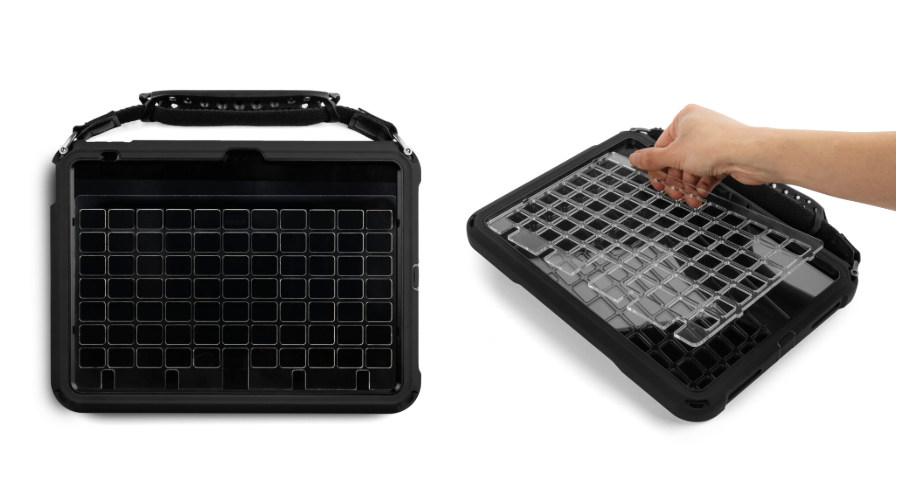
Keyguards help individuals use their QuickTalker Freestyle speech device more accurately by providing physical boundaries around each button. These protective overlays reduce accidental touches and provide tactile guidance, supporting independent communication for individuals with motor challenges or visual impairments.
Keyguards are available at no additional cost as part of ableCARE coverage for your QuickTalker Freestyle. Whether you need a standard template, a custom design, modifications or replacements, we’re here to support your communication needs.
Gather Your Information
Before you begin your Keyguard request, you’ll need to have the following information on-hand:
- Funding Request Number (FN)
- Shipping information
- Caregiver or Legal Guardian’s email address
- iPad size
- Device type
- Speech App name
- Sub-Category and Layout of the page you’d like a Keyguard for
Fill Out the Keyguard Request Form
Head over to the Keyguard request form.
- Fill in your FN Number.
- Fill in your SLP information.
- Fill in your Ship-To information: this could be the QTF user’s home or school.
Filling in the Keyguard Information
- Enter the client’s first and last name.
- Enter the family/legal guardian’s email address.
- For “Is this keyguard for your ableEXPERIENCE device?”
- Select Yes if your QTF has not yet been funded.
- Select No if your QTF has been funded by insurance.
- For “iPad Size” select QuickTalker Freestyle or QuickTalker Freestyle Mini.
- Select your preferred Keyguard Color: clear or black.
- Select the amount of this keyguard layout you will need.
- For “Does your case have one or more QR codes on the kickstand?”
- Select Yes if you see four threaded holes and one or more QR codes.
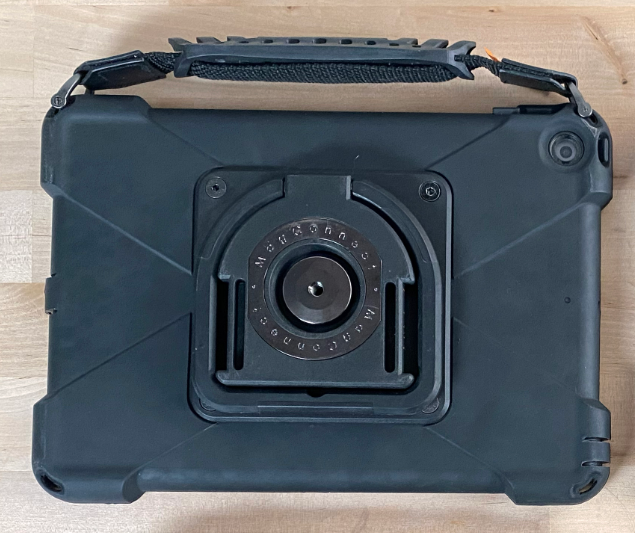
- Select No if you see a round magnet.
Speech App Information
IMPORTANT: Please make sure you have completed all of the previous fields before moving on to this step. Depending on your previous selections, some options will populate into the drop downs.
Standard Keyguard Templates
Standard templates are the quickest and simplest way to get a Keyguard for your device. If you select Other for “Select an AAC App” or “Layout Name” you will need to follow the Custom Keyguard Template directions below.
- Select an AAC App: Choose your speech app from the list of options.
- Layout Name: Select the name of the layout you would like a keyguard for.
- Keyguard Preview: Take a look at the image that populates. The blue outlines are where the keyguard will rest. If you like what you see, select Looks Good! Please create that keyguard.
- If you want to make changes to the keyguard, select I would like to make changes. Then follow the instructions below for Custom Keyguard templates starting with #5.
- Add any additional comments you might have for the team.
- Verify that you are human and hit Submit.
Custom Keyguard Template
- For either “Select an AAC App” or “Layout Name” select Other.
- Add your “Other app name” if needed.
- Add your “App Layout.” If you’re not sure of the full name, add the grid size.
- “Do you have physical access to the device to obtain a screenshot of the app layout?”
- Select yes if you can take a screenshot and upload it to the form.
- Select no if you can’t take a screenshot.
- Upload a screenshot of the requested keyguard: If you are able, take a screenshot of the layout and upload it here. You may also be able to find examples online or by looking at Speech Apps pages.
- If you need help doing this, follow the steps in Taking a Screenshot with QuickTalker Freestyle.
- Add a File Name.
- Verify that you are human and hit Submit.
What Happens After I Order?
Once you submit your keyguard request:
- We’ll review your order and confirm your device information.
- If you selected a standard template, we’ll begin making your keyguard.
- If you requested a custom keyguard, we’ll create a layout for your approval before making it.
- Your keyguard will be shipped to you with installation instructions.
Installation Instructions
Once you receive your keyguard, refer to the installation guide included with your shipment. You can also find detailed installation instructions online:
- Integrated sideCLICK Keyguards: Setup and Use (for QuickTalker Freestyle – Four Threaded Holes)
- Legacy Keyguard Information (for QuickTalker Freestyle – MagConnect)
Keyguard FAQs
Where do I find my Funding Request Number (FN)?
You can look up your FN using the Find My FN Tool.
How do I know what iPad size I have?
If you’re unsure of your device size, measure your screen diagonally and reference the chart below.
| Device Type | QuickTalker Freestyle | QuickTalker Freestyle Mini |
|---|---|---|
| QR Code Case | 11″ Display | 8.3″ Display |
| MagConnect Case | 10.2″ Display | 8.3″ Display |
How do I know what device type I have?
Look at the back of your device. If your device has four threaded holes and one or more QR codes on the back kickstand, then you have a QuickTalker Freestyle – Four Threaded Holes.

If you see a round MagConnect attachment on the back of your device, then you have a QuickTalker Freestyle – MagConnect.
Can I request round openings instead of square?
Yes! You can request a custom keyguard with round openings by selecting “Other” in the Select AAC App dropdown. In the Additional Comments field, include your app name, grid size, preferred opening shape, and any other specifications, and attach a screenshot of your layout.
Example: Proloquo2Go – 6×10 grid – round openings – no swipe – icons on
How do I find the name of the layout for my speech app?
Each app uses a different vocabulary and most have adjustable grid sizes. Use our speech app guides to find out the vocabulary that they use. Check your app settings to see what grid size you have selected.
If you’re not sure, you can always select a “custom” option on the order form or contact the ableCARE team for assistance.
What if I need keyguards for multiple devices or multiple layouts?
Have multiple clients/users? Please submit a separate request for each user and/or each layout!
Why would I want duplicates of a keyguard layout?
There are a few reasons! Things break, so sometimes having a spare on hand is a good idea. It could be a good idea to have one at home and another at school.
How long will it take to receive my keyguard?
Standard templates: Manufacturing typically begins within two business days of your order.
Custom keyguards: Timeline varies based on design complexity and your approval process. We’ll work with you to create the right solution and keep you informed every step of the way.
How do I modify an existing keyguard?
Before you submit a new keyguard request be sure to select “Custom” so that we can reach out to you and confirm your customizations.
How do I order a replacement keyguard?
If you recently received a replacement device through warranty and your device now requires the integrated sideCLICK Keyguard, submit a new keyguard request with your current device information. Replacement keyguards are available free of charge to all QuickTalker Freestyle users.
Still Stuck?
The ableCARE Product Support Team is here to help!
