


Keyguards fit over your speech app’s buttons, creating a border users can feel around each one. This reduces accidental touches and supports independent communication for people with motor challenges or visual impairments.
Keyguards are available at no additional cost as part of ableCARE coverage for your QuickTalker Freestyle. Whether you need a standard template, a custom design, modifications or replacements, we’re here to support your communication needs.
Before You Begin
Have this information ready before you start your keyguard request:
- Funding Request Number (FN)
- SLP’s information
- Shipping information
- Caregiver’s or legal guardian’s email address
- iPad size and device type (see “Keyguard FAQs”)
- Speech app name, vocabulary category, and layout name (see “Keyguard FAQs”)
Instructions
- Open the keyguard request form.
- Enter your FN, your SLP’s information, the shipping address, and the client and guardian details.
- Enter your device size, keyguard color, and how many keyguard duplicates you need.
- Under “Is this keyguard for your ableEXPERIENCE device?”
- Select Yes if your QuickTalker Freestyle hasn’t been funded yet.
- Select No if it has been funded by insurance.
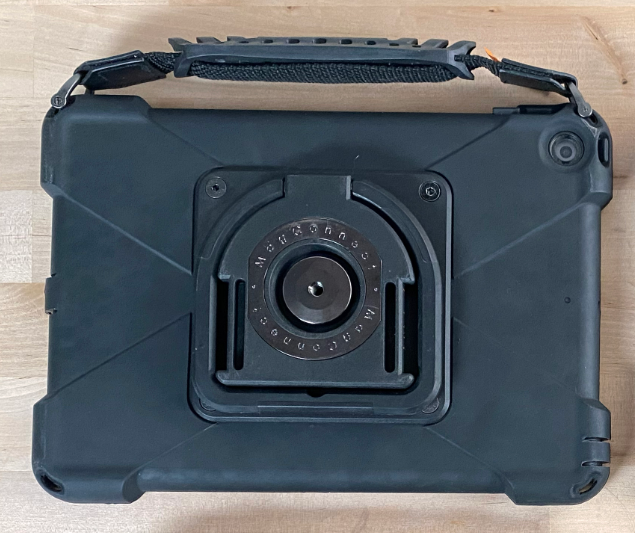
- Under “Does your case have one or more QR codes on the kickstand?”
- Select Yes if you see four threaded holes and one or more QR codes.
- Select No if you see a round magnet.
- Choose your speech app and layout. These options appear only after you complete the earlier fields. If yours isn’t listed, select Other.
- Review the keyguard preview, then select Looks Good! Please create that keyguard. or I would like to make changes.
- Upload a screenshot of your layout if you selected Other or asked for changes. If you’re not sure of the layout name, enter the grid size.
- For help see Take a Screenshot and Share a Screenshot or Photo
- Verify that you’re human, then select Submit.
What Happens After You Order
We’ll review your order and confirm your device information. Standard keyguards go straight into production. For custom keyguards, we’ll send you a layout to approve first. Your keyguard ships with installation instructions.
Install Your Keyguard
- “Integrated sideCLICK Keyguards: Setup and Use” (for QuickTalker Freestyle — Four Threaded Holes)
- “Legacy Keyguard Information” (for QuickTalker Freestyle — MagConnect)
Keyguard FAQs

Need More Help?
Our support teams are available Monday – Friday, 8 a.m. – 5 p.m. CST.
-
ableCARE Product Support
For technical issues related to QuickTalker Freestyle or assistive technology products.