
Keyguards for QuickTalker Freestyle Speech Devices


Keyguards for QuickTalker Freestyle Speech Devices
Keyguards help individuals use their QuickTalker Freestyle speech device more accurately by providing physical boundaries around each button. These protective overlays reduce accidental touches and provide tactile guidance, supporting independent communication for individuals with motor challenges or visual impairments.
Keyguards are included as part of ableCARE coverage at no additional cost. Whether you need a standard template or a custom design, modifications or replacements, we’re here to support your communication needs.
If you’re looking to order a new Keyguard, Click here.
Which Keyguard Do I Need? 🔗
The right keyguard depends on your device version. Look at the back of your QuickTalker Freestyle speech device to identify which version you have.
I Have a QuickTalker Freestyle – Four Threaded Holes

Your device has four threaded holes and one or more QR codes on the back kickstand.
You need an Integrated sideCLICK keyguard
I Have a QuickTalker Freestyle – MagConnect
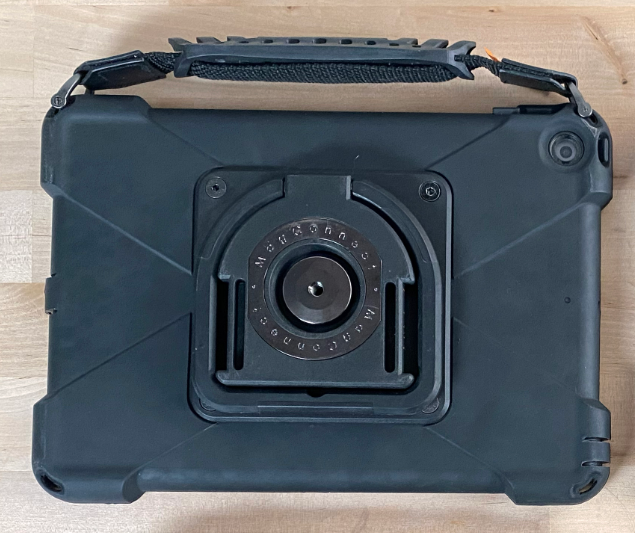
Your device has a round MagConnect attachment on the kickstand (no QR codes or threaded holes).
You need a legacy sideCLICK keyguard compatible with your case version
I Don’t Have a Device Yet
If you’re planning to order a QuickTalker Freestyle speech device or are in the process of getting one, you can order your keyguard at the same time or after your device arrives. Learn how to order a keyguard
I’m Not Sure Which Version I Have
If you’re having trouble identifying your device version or have questions about keyguard compatibility, we’re here to help.
If you need help ordering a keyguard, please review this artice: How to Order QuickTalker Keyguard for Your Device
Contact the ableCARE Product Success Team at (651) 294-3101
Already Know What You Need? 🔗
The ordering process takes just a few minutes. You’ll be able to choose between clear or black keyguards and select either a standard template that matches your speech app or request a custom design.
What Happens After I Order? 🔗
Once you submit your keyguard request:
- We’ll review your order and confirm your device information
- If you selected a standard template, we’ll begin making your keyguard
- If you requested a custom keyguard, we’ll create a layout for your approval before making it
- Your keyguard will ship directly to you with installation instructions
Learn More 🔗
Questions? 🔗
Contact the ableCARE Product Support Team for assistance with keyguard selection, ordering, or installation.
Phone: (651) 294-3101
If you have a question about an existing order, please contact us at [email protected].
Was this article helpful?
0 of 0 found this helpful
