
Getting Started With Integrated sideCLICK Keyguard


Keyguards help individuals use their speech devices more accurately by providing physical boundaries around each button. These protective overlays help users target selections while reducing accidental touches. For individuals with motor challenges or visual impairments, keyguards provide tactile guidance that supports independent device use.
If you’re looking to order a new Keyguard, Click here.
Compatibility🔗
We have several different types of keyguards to fit different versions of the QuickTalker Freestyle as well as different speech apps. It’s important to note which version of the device and which speech app you have to ensure proper fit.
Device Type🔗
To determine whether your QuickTalker Freestyle or QuickTalker Freestyle Mini is compatible with the Integrated sideCLICK keyguard, look for the two integrated keyguard holes on the left and right sides of your device’s screen, AND verify that there are one or more QR codes on the kickstand.
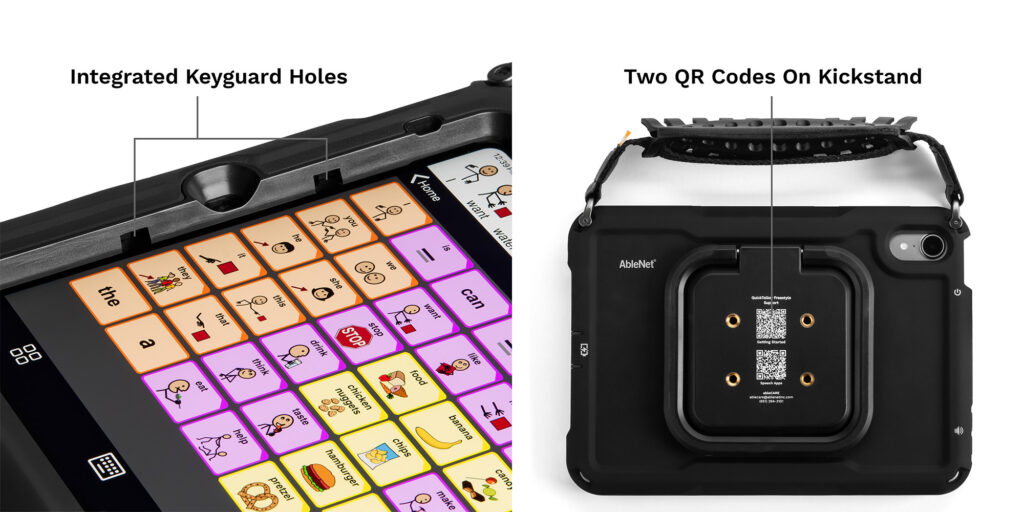
Mine doesn’t look like that!🔗
If your device does not have Integrated Keyguard Holes or one or more QR codes on the back, please click here for information on a keyguard that is compatible with your device.
If you have an existing keyguard but replaced your QuickTalker Freestyle with a model that has one or more QR codes on the back, please click here to order new ones.
If you have any questions, about your device and compatibility with a keyguard, please contact the ableCARE Product Support Team for further assistance.
Getting Started🔗

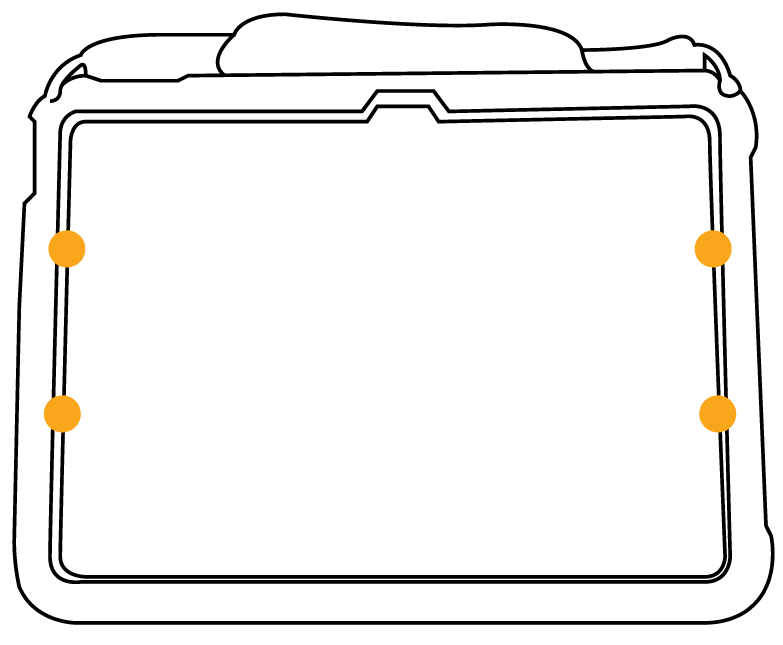
How to Install Your Integrated sideCLICK Keyguard 🔗
Installing your Integrated sideCLICK keyguard takes just a few seconds:
- Hold the keyguard at an angle and align the two tabs on one side with the integrated holes on that side of your device’s screen
- Insert the tabs into the holes on one side
- Firmly press down on the opposite side of the keyguard until the tabs lock into place
- Verify the keyguard is secure by gently testing the edges
To remove the keyguard: Firmly pull up from the center of the keyguard to release both sides at once.
You can Download the Quick Start Guide here.
Tips for Daily Use 🔗
- Cleaning your keyguard: Remove the keyguard from your device before cleaning. Wipe with a soft, damp cloth and allow it to dry completely before reinstalling.
- Checking the fit: Periodically check that your keyguard is fully seated in the mounting holes. If the keyguard feels loose, remove it and reinstall following the steps above.
- Traveling with your device: The keyguard can remain installed during transport. If you prefer to remove it, store it in a protective sleeve or case to prevent scratches.
When to Request a New Keyguard 🔗
You might need a new keyguard if:
- Your speech app layout has changed and the current keyguard no longer matches your button arrangement
- The keyguard has become damaged or worn
- You want to switch between clear and black keyguard options
- You received a replacement device and need a keyguard for the new unit
All keyguard requests, including modifications and replacements, are available free of charge to all QuickTalker Freestyle users. Request a new or replacement keyguard
Troubleshooting 🔗
The keyguard won’t lock into place
Ensure you’re aligning the tabs with the correct holes on each side. The tabs should slide in smoothly. If one side is installed, apply firm, even pressure to the opposite side until you hear or feel it click into place.
The keyguard feels loose after installation
Remove the keyguard completely and reinstall it, making sure both sides are fully seated. If the keyguard continues to feel loose, contact us for a replacement.
The keyguard doesn’t match my button layout
If your speech app layout has changed since you received your keyguard, you can request a new keyguard that matches your current layout at no cost.
Still need help? Contact the ableCARE Product Success Team at (651) 294-3101 or [email protected].
Video Tutorials 🔗
- Integrated sideCLICK Keyguard Setup for QuickTalker Freestyle Watch video
- Integrated sideCLICK Keyguard Setup for QuickTalker Freestyle Mini Watch video
Questions? 🔗
Contact the ableCARE Product Success Team for assistance with installation, troubleshooting, or ordering.
Phone: (651) 294-3101
Email: [email protected]
Related Articles 🔗
For questions contact ableCARE at (651) 294-3101 or [email protected]
Was this article helpful?
1 of 2 found this helpful
