


TD Snap can stop speaking because it isn’t connected to Wi-Fi, your TD Snap subscription isn’t active, the device’s volume is lowered, or there is debris in the speaker or headphone jack. Read on for solutions!
Check Your Subscription
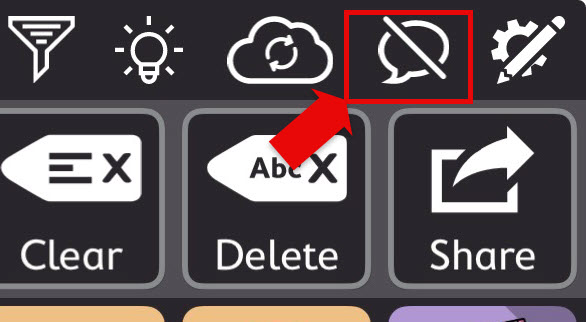
A disconnect from your TD Snap Subscription is the most common cause of your app not speaking. If you look in the top right and see a speech bubble with a slash through it, then there is something wrong with your subscription.
Step 1: Ensure You Are Connected to Wi-fi
- Open Settings.
- Select Wi-Fi on the left-hand side.
- Choose a Wi-Fi network and enter the password.
Important Note: TD Snap periodically checks to make sure your monthly subscription has been paid. The device needs to connect AT LEAST once a month.
Step 2: Add a Billing Address to Your Apple Account
- Open Settings
- Click on your QuickTalker Freestyle Apple Account at the top left.
- Tap Payments & Shipping
- You should see a payment option and gift card balance at the top.
- On the next screen, it will ask you for a credit card; instead, tap the back button at the top left of your screen.
- On this page, add your address under “billing address” which doesn’t require a credit card.
Step 3: Re-Activate Your Subscription in the TD Snap App
- Open TD Snap.
- In the top right, select the Speaking Upgrade button. It will look like a speech bubble with a slash through it.
- Follow the on-screen prompts to complete the subscription.
If you run into any issues please contact the ableCARE Product Support Team.
Check the Device Settings and Condition
It may be that the device is dirty, damaged, or the volume is low or muted.
Check the Device Volume
For the QuickTalker Freestyle with the handle facing the ceiling, the volume buttons are on the left side of the top edge, under the handle. Press the button on the left.
For the QuickTalker Freestyle Mini, the volume buttons are on the bottom of the left edge, with the case handle facing towards the ceiling. Press the button closest to the handle.
Physically Inspect the Device
Remove the device from the case by peeling one of the rubber corners away from the case. Once you have access, the rubber can be carefully peeled from the plastic frame like a banana.
Look for dirt or debris on the speakers. If there’s any, turn off the device and clean it with a soft brush.
Then, clean the port and case. Rubbing alcohol can be used to clean the port, but make sure the device dries for 10 minutes before turning it back on.
If the case is damaged, you can request a replacement through our warranty form.
For Devices With a Headphone Jack
The standard QuickTalker Freestyle will have a Headphone Jack. Inspect the headphone jack for debris. Debris can cause a short, and will not produce any sound out of the speakers. You can also tell if this has happened as the volume will display a headphone symbol when changing it.
It can be cleaned with rubbing alcohol and a soft brush like those used to clean braces or a pipe cleaner should fit. Ensure the device is not powered when cleaning and let it dry for 10 minutes before powering it on.
Still Stuck?
The ableCARE Product Support Team is here to help!
