ableFamilies Ideas


Jump to a Section



Device Tips
Set up your QuickTalker Freestyle, personalize it, and make it part of your daily routine!
Traveling? Bring Your AAC Along!
Heading somewhere new? Whether you’re visiting family, exploring a new city, taking a road trip, or traveling to another country, your QuickTalker Freestyle can help your child be part of the adventure.
Before you go, think about all the new things your child might see, hear, taste, and experience. Instead of only adding words like airport, airplane, and hotel, think about your actual trip. Where are you going? What will you do? Who will you see?
You might add or model words like:
- Beach
- Restaurant
- Family
- Train
- Bus
- Passport
You can also add specific places, foods, activities, or people you’ll encounter. Going to see family? Add their names. Visiting a famous landmark? Add it! Trying a new food? Give your child a way to talk about it.
Every trip looks a little different, so think about what makes your family’s adventure special and find ways to bring those experiences into your child’s communication.
Bringing Their Voice Along for the Ride
Summer is made for traveling. Long trips to Nana’s house or short trips to the shore, no matter where you’re headed this summer, you don’t need to leave your device at home.
We get it. You don’t want it to get broken, misplaced, or left behind, leaving your little one without their voice. Let us help relieve some of that stress.
You’re Covered
For any damaged, lost, or stolen devices, we have our 5 Year Warranty!
quickBACKGROUNDS
If the device ever gets misplaced, we also have quickBackgrounds. This is a custom, fun wallpaper where you can add your child’s name, your contact information, and any other details that make it special.
Feel free to get creative. Some parents in the ableFamilies community have used Bluey-themed luggage tags inspired by their kiddo’s favorite show. Taking it a step further, one of our parents shared how they decorated their AirTag to look like Mike Wazowski from Monsters, Inc.
Traveling can already feel like a lot, but bringing their voice with them shouldn’t have to.
Summer Fun Pack
Our Summer Fun Pack has three simple ways to bring your child’s voice outside this season — from a waterproof splash board for the pool, to a chalk driveway game that pairs with the QuickTalker Freestyle speech device, to a frozen treasure hunt packed with reasons to talk!
Don’t Forget Your Summer Backup!
Between vacations, camps, visits with family, and all the schedule changes coming this time of year, now is a great time to make sure your child’s QuickTalker Freestyle is ready for all the adventures ahead.
One thing that often gets overlooked? Backing up your child’s speech app.
We know how much time goes into personalizing a device. Maybe you’ve added favorite foods, family members, inside jokes, vacation spots, and all the little words that make your child’s communication unique. A backup helps protect your hard work.
Why Backups Matter
A recent backup can help if:
- A device gets lost during travel.
- Something is accidentally deleted or changed
- An app needs to be reinstalled.
- A device needs repair or replacement.
Why we recommend Dropbox
Dropbox is a simple way to store backups so they’re safe and easy to access when you need them. Dropbox basic is free and works great for storing backups.
Getting started is easy:
- Create a free Dropbox Basic account.
- Download the Dropbox app.
- Sign in on your device.
- Connect Dropbox to your speech app when prompted.
Once it’s set up, creating backups becomes much easier!
Make it Part of Your Routine
Many families find it helpful to back up:
- Before vacations or travel
- After adding important new vocabulary
- At the start of a new season or school break
- Once a month as part of regular device maintenance
A few minutes now can save a lot of frustration later.
Not sure how to back up your speech app?
Every app handles backups a little differently. You can find step-by-step instructions in our Speech App Guides!
Before summer gets into full swing, take a few minutes to:
Future you will thank you 😊
- Plug in the device
- Connect to Wi-Fi
- Check for updates
- Create a fresh backup
Backing Up Your Speech App: Why It Matters
When your child uses a speech device, a lot of time and care goes into building their vocabulary. Creating regular backups helps protect all that work and gives you peace of mind if something unexpected happens.
Backing up helps you:
- Keep custom words and layouts safe.
- Restore vocabulary quickly if an app is deleted, updated, or changed.
- Be prepared if a device needs repair or replacement.
Backup steps look a little different for each speech app.
You can find step-by-step guides for individual apps in our Speech App Guides!
We recommend using Dropbox to store backups. A free Dropbox Basic account works well and can be set up at dropbox.com/basic or through the Dropbox app.
If it’s been a while, take a minute to back up your speech app today.
Keep it Fresh: Updates and Customization Matter
Just like our phones and computers, your kiddo’s QuickTalker Freestyle needs regular updates to run smoothly. Take a few minutes this week to:
- Check for updates in your child’s speech app or device settings. Updates often include bug fixes, new features, and sometimes even expanded vocabulary.
- Add in and update real-life words: Think about what new things your child has been into or is interested in lately. Consider adding new friends, favorite snacks, TV shows, or places into their vocabulary.
- If Wi-Fi is accessible at home, make sure your device is connected so updates can be pushed out by AbleNet. If Wi-Fi isn’t available at home, try connecting at least once a month to a public Wi-Fi (e.g., Starbucks or a library).
- Make sure to turn off Guided Access when charging at night! Just like us, the device needs a rest outside of Guided Access.
Pro Tip: Get your child’s support squad involved! Ask teachers, siblings, and grandparents to share ideas for words or phrases to add. This not only builds a richer vocabulary but also helps everyone feel included in your child’s communication journey.
QuickTalker Freestyle-Back to School Tips
As we get ready for a new school year, there are a few simple things we can do as parents to help our child’s school team feel prepared and confident supporting their AAC device. Working together from the start helps ensure our children’s voices are available every day.
Need a little extra support?
AbleTeams helps educators, paraprofessionals, and ABA professionals get aligned on your child’s communication goals with practical QuickTalker Freestyle resources that make it easy to use the device the same way, everywhere. It’s one more way to help everyone on your child’s team stay connected, consistent, and on the same page!
Partnering with Your Child’s School Team
Create a “School People” Folder
As parents: Ask for or gather photos of your child’s teachers, therapists, and classmates to add to their AAC device. Having familiar faces available makes it easier for our children to identify people, start conversations, and talk about their school day.
School team: Share headshots (when appropriate) or a class photo to help build the folder.
Keep the Device Charged
As parents: Send an extra charging block and cable or a power bank in your child’s backpack.
School team: Set up a dedicated charging station in the classroom and make charging part of the daily routine.
Be Ready for Device Issues
As parents: Share AbleNet’s Force Restart instructions with your child’s team or ask if they’re familiar with the process.
School team: Learn how to perform a Force Restart so minor device issues can be resolved quickly.
Keep Communication Front and Center
As parents: Ask if Guided Access is being used during the school day to help keep the AAC device dedicated to communication.
School team: Use Guided Access to reduce distractions and ensure the device remains available for communication throughout the school day.
Protect Important Vocabulary
As parents: Talk with your child’s team about how and when vocabulary will be backed up.
School team: Regularly back up vocabulary files so personalized vocabulary is protected if the device needs to be repaired, replaced, or reset.
Have a Low-Tech Backup
As parents: Send a communication book, core board, or other low-tech backup with your child.
School team: Keep the low-tech backup accessible and use it whenever the AAC device is unavailable.
Parent Tip from the ableFamilies Community
“At the beginning of each school year, we gather headshot pictures of his teachers, therapists, and classmates and upload them to his Talker under a category called ‘School People.’ This helps him engage with everyone and reference people.” — Keri, MA
Helpful AbleNet Resources
- How to Perform a Force Restart of the QuickTalker Freestyle
- Guided Access
- Back Up Your Speech App
- Lite-Tech AAC Backups
A little preparation at the beginning of the school year can make a big difference. By partnering with your child’s school team, you can help ensure their AAC system is always ready, communication is supported, and your child’s voice is heard every day.
Back to School Prep With QuickTalker Freestyle
As a new school year begins, a little preparation can make a big difference in helping AAC users feel confident, connected, and ready to learn. These back-to-school tips for QuickTalker Freestyle users highlight simple ways to personalize the device, support successful communication across school environments, and take advantage of the resources and accessories available through AbleNet.
QuickTalker Freestyle Accessories
AbleNet offers several accessories to help students use their device successfully at school.
- Keyguards
- Reduce accidental button selections.
- Available in custom layouts.
- Great for students with motor challenges.
- quickWRAP
- Colorful handle covers.
- Can be personalized with a student’s name or nickname.
- Makes identifying devices easier.
- Carrying Accessories
- Handle
- Shoulder strap
- Kickstand
- Protective carrying features
- Mounting Solutions
- Wheelchair mounting
- Desk mounting
- Flexible positioning options
- Amplified Speaker
- Increases volume in noisy classrooms or large spaces.
- Blue2 FT Switch Access
- Allows switch scanning access for students with limited motor abilities.
- Eye Tracking (supported models)
- Eye gaze access for eligible QuickTalker Freestyle devices.
- Screen Protectors
- Tempered glass replacement options.
- Chargers & Replacement Power Supplies
- Families can request accessories through AbleNet’s support team during the warranty period.
Meet the AbleNet SLP Empowerment Team
The SLP Empowerment Team is a group of licensed speech-language pathologists dedicated to supporting students, families, caregivers, educators, and clinicians using AAC.
They can help with:
- Choosing the best speech app
- AAC implementation strategies
- Classroom integration
- Family coaching
- Troubleshooting communication challenges
- Device and speech app questions
- Ongoing support regardless of the speech app being used
Additional Resources Include
- Implementation ideas
- Instructional videos
- SupportHub articles
Personalized guidance from a real SLP—not just technical support.
Additional AbleNet Support
Families also have access to:
- ableCARE for technical support and troubleshooting.
- ableFamilies, which connects families with Parent Enthusiasts, practical AAC ideas, success stories, and community support.
- Warranty and service assistance.
Communication doesn’t stop at the classroom door. With the right preparation, consistent modeling, the support of AbleNet’s SLP Empowerment Team, and the right accessories, students can begin the school year confident, connected, and ready to communicate wherever they go.
Starting School With a QuickTalker Freestyle: What to Know
If this is your first time sending your child to school with their AAC device, take a deep breath…you’re not alone. For many of us (myself included), this is a big milestone. It’s exciting, emotional, and yes, a little overwhelming. But don’t worry, ableFamilies is here to walk this path with you. Every child is different, and every school system runs a little differently. There are a few tried-and-true steps that can help make the transition smoother for you and your kiddo:
Know you’re covered.
Your child’s QuickTalker Freestyle is backed by ableCARE: A Warranty Without Limits.
Create an AAC School Toolkit.
Before that first bell rings, pack a few essentials: the device charger, any backup accessories, and a printed cheat sheet with passwords or access info for the AAC app or system.
Build an AAC Plan with the school team.
This is a great time to meet with teachers, SLPs, and support staff. Share your child’s AAC goals, collaborate on a plan, and keep the conversation going throughout the year during IEP check-ins. You can also point them to our AAC resources for educators to support success in the classroom.
Ease into the school routine.
Practice new rhythms, like waking up early, packing a backpack, or prepping a lunchbox at home to help your child get used to what school days will look like.
Schedule a school visit (if you can).
Touring the school with your child, visiting the classroom, and introducing them to key staff ahead of time can make a huge difference in reducing first-day nerves.
And here’s the most important tip of all: You know your child best. You’re their strongest advocate, their biggest cheerleader, and the heart of their team. We’re here to help you every step of the way.
You’ve got this and we’re just an email away if you need support.
Returning to School: What to Focus on This Year
Here are a few key things to keep in mind as you head into this year:
You’re still covered.
Your child’s QuickTalker Freestyle is backed by ableCARE: A Warranty Without Limits, so you can head into the year with one less thing to worry about.
Refresh and reset.
Take a little time to update last year’s AAC pages. Swap out summer vocab for school routines, remove what’s no longer relevant, and add new words for this year’s schedule.
Proposal:
Take a little time to think about what words may be helpful to add for this school year! You can add in their classroom routine or even make sure they have a picture of their school in the device! For example, I always like to make sure my kiddo’s device has their new teacher’s name!
Reconnect with your school team.
Revisit your AAC plan, check in regularly during IEP meetings, and share our AAC classroom resources with any new teachers or staff.
Double down on what worked. T
hink back on what helped your child succeed last year; daily routines, communication strategies, specific supports, and build on those foundations.
Set new goals together.
Talk with your team about what progress might look like this year, both academically and with communication. Your voice matters in shaping the path forward.
You’ve done this before, but every year is a little different. The good news? You’re not starting from scratch. You’re building on a solid foundation, and you’ve got a community here to support you.
Let’s make this your kiddo’s best year yet!
QuickTalker Freestyle at School
Kids really take off when they have their Talker available all day and see people using it with them in real, everyday moments. It helps them feel confident and more independent.
Here are a few easy ways to make Talker use go smoothly at school:
Keep the Talker out and available all day
Our kids need their device during everything, not just “communication time.” When it’s always within reach, it sends the message that their voice matters no matter what’s going on:
- snack and lunch
- transitions
- group time
- recess
When the Talker is part of the routine, kids jump in more and use it naturally.
Model words on the Talker during real life moments
- No need to “teach” every button. Just model! That might look like:
- using the Talker as you talk
- tapping a button or two during everyday routines
- showing how communication can look—without pressure or expectations
Some super simple examples:
- tap “Go” during transitions
- tap “Help” when a kid is struggling
- tap “More” during something fun
- tap “Stop” during cleanup
These tiny models really add up.
Follow the child’s lead
Kids communicate best when we tune in to what they’re trying to tell us. If they point, grab, reach, or make a sound, adults can support by:
- modeling a related word on the Talker
- acknowledging their communication
- pausing and giving them time to respond
And just a reminder, you don’t have to figure this out on your own. Our SLP Empowerment Team are here to help whenever you need support.
QuickTalker Freestyle + IEP = School Success
Did you know your child’s QuickTalker Freestyle can be included in their IEP? AbleNet offers helpful resources to guide families through this process.
As a parent or caregiver, you have the right to request an IEP meeting at any time to discuss accommodations that support your child’s needs. Advocating for AAC inclusion can foster communication growth, independence, and meaningful participation throughout the school day.
There are many organic opportunities to incorporate the QuickTalker Freestyle into classroom routines — such as circle time, story time, snack time, and academic activities. For example, your child might use their device to request a break for self‑regulation or to make choices during classroom activities. One of our ableFamilies members’ kiddos even uses their device to count while working on addition.
It’s also important that everyone in the classroom is involved, including your child’s peers. When classmates understand and engage with the device, it creates a more inclusive and supportive environment. At the same time, your child’s support team should consistently observe, collect data, and document progress to ensure the AAC system is being used effectively.
If a QuickTalker Sits in a Backpack, Does It Make a Sound?
You’ve heard the old saying: if a tree falls in the woods and no one’s around, does it make a sound? Some might say yes… but the truth is, we’ll never know, because it’s not around to be heard.
The same goes for your QuickTalker Freestyle! If it’s tucked away in a dresser or left zipped up in a backpack, how can your child use it to share what they need or how they feel?
Keeping the device visible and accessible helps spark natural communication throughout the day. Try using it during everyday moments:
- Use the QuickTalker while watching Miss Rachel: react to what she says, practice vocabulary with her by pushing the corresponding button
- Ask questions during snack time: model asking for a snack and then selecting a specific one with the QuickTalker.
- Get them interested with Bluey: create a custom board with Bluey images that they can push while they watch
Nicole from Minnesota, one of our ableFamilies Parent Enthusiasts, put it perfectly: “We make sure the Talker is always available. We model not just communication, but having fun and being silly with it too!”
Your AAC journey is a marathon, not a sprint, and the first step is simple: make the Talker part of the environment. Start small, stay consistent, and you’ll see big progress over time, one modeled moment at a time.
Create an Emergency Contact Page on Your QuickTalker Device
Emergencies can happen anywhere: school, home, community outings, or at medical appointments. Having a dedicated emergency contact page on the QuickTalker Freestyle helps you to quickly access important information when it matters most.
- Parent/caregiver names and phone numbers
- Emergency contacts
- Allergies or medical information
- Preferred hospital or physician
- Important calming/support strategies
- “About Me” information for first responders or unfamiliar communication partners
Consider including:
An emergency page can provide reassurance, improve safety, and support faster communication during stressful situations.
You can also personalize your device by downloading a custom quickBACKGROUND for your QuickTalker Freestyle. Backgrounds can help organize communication, improve visual appeal, and make the device feel more personal and engaging for the user.
Taking Care of Your QuickTalker Freestyle
We all know life gets busy — and sometimes the device just becomes one more thing to remember. But a few small habits can make a big difference in keeping your child’s QuickTalker ready to go when they need it.
Here are a few easy ways to build device care into your daily routine:
Keep It Charged and Ready
Just like a phone or tablet, the QuickTalker works best when it’s charged and easy to grab.
- Plug it in at the same time each night (bedtime routines work great for this)
- Keep chargers in consistent spots so they’re easy to find
- If possible, have a backup charging spot in a common area
Connect to Wi-Fi Regularly
Staying connected helps make sure everything is running smoothly.
- Connect your device to Wi-Fi at home when you can
- Updates often happen in the background and help keep things working the way they should
Let It Update Overnight
Occasionally your device need a little downtime to stay up to date.
- If you’re using Guided Access during the day, try turning it off at night so updates can run
- Plugging in + Wi-Fi + Guided Access off = a setup for overnight updates
Keep It Clean (because… kids)
- Devices go everywhere, so a quick wipe-down can help keep things working smoothly.
- Wipe the screen and buttons with your preferred disinfectant wipes regularly.
- Check for sticky spots or crumbs that might affect sound or buttons.
Make It Part of Your Routine
The easier it is to remember, the more consistent it will be.
- Pair charging with something you’re already doing (like brushing teeth or bedtime stories)
- Keep the device in a “home spot” when it’s not in use
These small steps help ensure your device is always ready for those important communication moments — whether it’s asking for a snack, joining a game, or sharing something exciting.
If you ever run into issues or have questions, our SLP Empowerment Team is here to help. Submit a question and we’ll get back to you ASAP.
Keeping Your QuickTalker Freestyle Charged
Keeping your QuickTalker Freestyle speech device charged is key to real success.
Here are some tips for charging your device:
- Consider designating a specific space in your home for daily charging overnight.
- Incorporate plugging-in your device into your user’s nightly bedtime routine.
- To ensure the best performance, use only Apple-certified charging cables.
Carry It Everywhere, Use It Naturally
Availability builds interest.
When AAC is always within reach—even if it’s not used every minute—it sends a powerful message: your voice matters anywhere.
Why This Works
Consistent access reduces pressure. Your child can explore without being prompted every time.
Modeling small, natural words adds up. A quick “go,” “more,” or “look” during everyday moments makes AAC feel practical and real.
Exploration builds ownership. Navigating and pressing buttons independently strengthens familiarity and confidence.
Interest grows over time. When AAC is part of daily life (not just therapy), curiosity increases.
It opens advocacy moments. Having the device visible creates opportunities to teach others how your child communicates.
Try This
- Pick one daily routine (grocery store, playground, dinner, car rides, etc.)
- Bring the QuickTalker Freestyle.
- Model 1–3 simple words naturally.
- Allow time for exploration without expectation.
- If someone asks about it, briefly explain how your child uses it.
Remember: We’re not aiming for constant use. We’re building comfort, curiosity, and connection. AAC doesn’t have to be “on” all the time — it just needs to be available.
Never Leave Home Without It
Hitting the road with your QuickTalker Freestyle can feel overwhelming. What if it breaks? What if you forget it? How do you even use it outside of the house? We get it. But the truth is, your little ones deserve to take their voice with them everywhere—and with a few smart tips, it’s totally doable.
- Pack it with the essentials. Treat it like shoes or a backpack! Bundle it with the daily gear your kiddo never forgets, and you’ll never forget it.
- Use the QuickTalker Freestyle strap. Hands-free, worry-free. This strap makes it easy for your child to carry their talker. Bonus: AbleNet provides it free of charge—just ask!
- Don’t sweat the accidents. AbleNet’s warranty is AH-MAZ-ING. It covers accidental damage, loss, theft, and more. Plus, you’ve got ableCARE for fast support and peace of mind.
- Set a visual reminder. No shame in going lo-fi. A sticky note on the door works wonders. Also, a QuickTalker Freestyle reminder is an awesome idea…maybe we’ll make one for our ableFamilies. 😉
Hopefully, one of these tips makes your next outing a little less stressful.
Did we forget one, or do you have a strategy we didn’t mention? We’d love to hear it! Let’s keep the conversation going on our Facebook page. See you there.
Keys, Phone, Wallet, AAC: Your QuickTalker Freestyle Daily Routine!
You should always bring your kiddo’s AAC device along for every adventure, big or small! Whether you’re heading out for errands, playdates, school, or appointments, having their device means they always have access to their voice. When it’s part of the routine, communication stays easy, confidence grows, and meltdowns from frustration can often be avoided.
To make it simple, build it into your daily sequence. Try a Daily Device Checklist, set phone reminders, use a shoulder strap, add visual cues like a sign by the door, or pair it with another must-have like your phone or wallet.
Practice a consistent departure routine and let your kiddo help – they’ll love being a part of the process. Before you know it, grabbing the AAC will feel as natural as grabbing your phone.
Let’s make every outing a communication-friendly one!
Breakfast of Champtions: A Daily QuickTalker Freestyle Routine
A simple, predictable morning routine can do wonders to help your kiddo feel grounded and ready for the day. It’s also the perfect time to build the QuickTalker Freestyle into everyday life in a natural, low-pressure way. This week’s tip was inspired by one of our parents in the ableFamilies community.
Start by adding to or creating a dedicated breakfast page with the foods and drinks your child sees at home; anything from oatmeal and bananas to milk or juice.
Then, each morning, show your kiddo the actual options and let them choose using the talker. You can keep this page simple or make it as detailed as your child needs.
To go the extra mile, try navigating to a page that shows what comes next after breakfast! It could be getting dressed, brushing teeth, packing a backpack, or even watching a movie.
Starting the day with the device is a powerful way to reinforce communication, build independence, and weave the QuickTalker Freestyle into real life, and it’s the perfect low-stakes introduction for the kiddo just starting out using the device. Give it a try! Customize a breakfast page and see how it shapes your day.
Guided Access: Keeping the QuickTalker Freestyle
As you use the QuickTalker Freestyle speech device, it’s important to establish this device as a tool for communication, not as an iPad for entertainment. To help with this, consider enabling Guided Access.
Guided Access ensures the device stays locked on the speech app and therefore ready for speech!
Hey, That’s Mine! Making the Device Their Own
If you’ve ever noticed your child pushing their device away, or losing interest, you’re not alone. One thing we hear from families all the time is how much of a difference it makes when the device actually feels like it belongs to their child.
There’s no one-size-fits-all with communication, but when a QuickTalker reflects your child’s personality, interests, and everyday life, it naturally becomes something they want to use — not something they’re told to use.
Here are a few simple ways to make your child’s QuickTalker feel more theirs:
Make It Theirs (on the outside)
Sometimes it starts with how it looks. Just like kids love picking out their backpack or water bottle, giving them some ownership over their device can go a long way.
- AbleNet offers quickWRAPs — personalized handle covers with your child’s name — which can make the device feel more special and recognizable. Order a Disney or solid colored quickWRAP.
- You can also create a personalized quickBACKGROUND with your contact info, which is helpful if the device ever gets misplaced. Download a Custom quickBACKGROUND.
Make It Theirs (on the inside)
This is where the magic really happens. When the vocabulary matches your child’s world, communication becomes more meaningful.
- Swap in real photos of family members, favorite foods, toys, or places
- Use words the way your child says them (for example, “juice” vs. a specific brand name they love)
- Add fun or silly phrases they enjoy — not everything has to be functional to be valuable
Customization is key, but remember to leave the core words or home screen mostly as-is. These are the words your child will use all the time and combine in lots of different ways, so keeping them consistent gives them a strong foundation to build from.
From a communication standpoint, this kind of personalization helps kids connect what’s on the device to their real life. It makes it easier for them to find words, use them more often, and actually want to communicate.
When kids see themselves in their device, it starts to feel less like “something they have to use” and more like something that’s truly theirs.
Real Coverage for Real Life
Things get dropped, stepped on, or left at the park. It happens. That’s why having a great warranty is such a relief. It’s like a little safety net for your sanity.
Your QuickTalker Freestyle includes a 5-year warranty. We strive to make the process super easy and lightning fast. The warranty request form is your one-stop shop for most things related to your device. It only takes a few seconds to submit your warranty request for a repair, to change speech apps or device sizes, or to report a lost/stolen device.
So don’t worry about your QuickTalker, we got you. Take it everywhere — school, errands, adventures. That’s what it’s built for, and the warranty’s got you covered if something happens.
Yes or No? The Power Is in Their Hands!
Parent Enthusiast, Jessica has days when her child just clicks on a picture of an item on his device to communicate with her, but there are other moments when she wishes she could get her son to answer a question on the fly. So, she recently added a “Yes” and “No” button to his device. She tried this out consistently for several days, and what she found is that with persistence and patience, it works!
The idea is to ask a simple question that may not already be built into your speech app to see if it can be answered. Jessica asked her son questions such as, “Are you tired?”, “Would you like tickles?”, and “Would you like some juice?” To her surprise, he knew exactly what she was asking. On her first try, he giggled his way out of answering. Over time, he did answer the questions and even revealed his personality while doing it. 😄
Our advice is to be clear, be consistent, be patient, and give yourself grace.
Below is a clip of Justin’s first attempt at answering a Yes/No question, and then a later attempt after some practice. It is still a work in progress, and that is okay!
Encourage Peer Play With the QuickTalker Freestyle
One of the best ways to spark your child’s interest in using the QuickTalker Freestyle is by showing how fun and engaging it can be…especially when friends are using it too! That’s where siblings, cousins, friends, and even grandparents come in.
When peers and family members explore the QuickTalker, it helps your child see it as a shared tool for communication, not just something they have to use. It also helps bridge the knowledge gap, making everyone more confident and connected. It can also be fun and create shared moments!
Here are a few simple ways to involve others:
- Add their names and photos to the QuickTalker
- Let them create funny phrases
- Have them find their favorite foods, colors, or activities on the device
These small steps can turn everyday playdates into powerful learning moments. It also creates bonding opportunities and helps others better understand how your child communicates; building empathy, connection, and confidence for everyone involved.
Next time friends or family are around, invite them to join in the fun. You might be surprised how quickly the talker becomes a shared language!
Activities and Games
For fun, everyday ways to build comfort, confidence, and connection with the device.
Take AAC On an Adventure
With AAC, the adventures never end! Whether you’re heading to the state fair, visiting family, taking a camping trip, or traveling somewhere new, bring your QuickTalker Freestyle along for the ride.
Before you leave, think about what your child might want to see, do, eat, or talk about during the trip.
For example, if your family camps often, you could find or add or model words like:
- Campfire
- Trailer
- Outside
- Hike
- Swim
- Fishing
- S’mores
If you’re heading to the state fair, you might think about words like:
- Rides
- Animals
- Food
- Games
- Music
- Fun!
And don’t be afraid to get specific! If you’re traveling somewhere new, think about the places you’ll visit, the people you’ll see, and the activities your child might want to participate in.
Try this: Look at your next trip or weekend plans and make a list of 5–10 words your child might want to use. You might find that your everyday adventures are full of communication opportunities!
Scavenger Hunt
Games like scavenger hunts are an easy way to help kids learn to use their QuickTalker Freestyle without it feeling like work. When they’re excited and moving around, they’ll naturally use more language. They’ll get a chance to ask for clues, tell you what they see, or celebrate when they find something.
Games offer plenty of opportunities to model simple, everyday words like “look,” “go,” “help,” and “where?” in real moments. Plus, it turns AAC into something fun you do together, not just another task on the list. It builds confidence, connection, and real communication skills—all through play. And the best part? Your child gets to feel successful while just being a kid.
We’ve got two kinds of scavenger hunts you can try:
- Vocabulary Find & Tap: This happens all on the QuickTalker Freestyle!
- Real-Life Hunt & Describe: a real-world scavenger hunt that gets everyone up and moving.
🐣 Egg-citing Spring Activities
Celebrate spring and Easter with activities that spark joy and encourage your child’s voice! With QuickTalker Freestyle, every day is a new opportunity to connect and grow together. Try these simple, engaging ideas at home:
The Bunny Hop Game
Place action cards or simple pictures inside plastic eggs with actions like hop, clap, spin, jump, or stomp. Have your child open an egg and use their device to say the action or model the action before everyone does it together. It’s a fun way to get everyone moving and communicating
Picnic Time!
Set up a little picnic in the backyard, at the park, or even on a blanket in the living room. Let your child help choose snacks using their QuickTalker Freestyle and model words during the picnic like “eat,” “drink,” “more,” “all done,” or “yummy.” You can also let them help decide where to sit, what to eat next, or when it’s time for “more” snacks.
Spring Sensory Bin
Fill a small bin with plastic eggs, fake grass, toy chicks, flowers, and small scoops. This is a great hands-on activity for exploring and talking at the same time. You can model words like:
- Describing: big, little
- Actions: in, out, open, close
- Requesting: want, more
🍀St. Patrick’s Day
St. Patrick’s Day is a fun holiday that celebrates Irish culture and traditions. With green foods, mischievous leprechauns, and plenty of crafts like leprechaun traps and paper shamrocks, it’s an exciting time for kids. But the million-dollar question is: How can you turn all that fun into an AAC activity with your QuickTalker Freestyle?
Well, thank your lucky charms, we’ve got you covered. This game is called “Where’s the Leprechaun?” or “Leprechaun Hide-and-Seek!”. It’s easy to set up and turn your child’s device into a fun little game that encourages exploration, engagement, and hopefully a sham-rocking good time.
Here’s How it Works:
- Add a small leprechaun button somewhere within the pages of your child’s QuickTalker Freestyle.
- Place it on a few different pages of the device.
- Only one of the buttons should link to a “You found me!” message.
- Your child then searches through their device to try to find the leprechaun. Super simple!
Need help with adding a button? Check out our speech app guides here!
This helps turn the search into a natural AAC learning moment while your child explores their device. Have fun setting up the game, and if your kiddo finds the leprechaun, we’d love to hear how the hunt went!
🦃 Turkey Time Fun: Thanksgiving & Family Gatherings
During Thanksgiving, I try to make sure my kiddo’s device is charged, nearby, and loaded with holiday words like “turkey,” “pie,” and names of the people he will see. Keeping it within reach makes it so much easier for him to jump into conversations throughout the day.
I also try to plan for the busy, noisy parts of the holiday by modeling simple phrases like “I need a break” or “I feel tired.” And honestly, everyday moments like cooking together, setting the table, hanging out in the kitchen—end up being the more convenient opportunities to model words like “more,” “help,” “all done,” and “open.”
When the Thanksgiving parade comes on, we make it fun by using his AAC device to comment on what we see. I will model things like “Look!” or “That’s funny,” and we keep some excited words ready too, like “Bingo!” and “Yay!” so my kiddo can join in the excitement.
We usually grab a bingo card for the parade, and it turns the whole thing into a little family game. It keeps my kiddo engaged, gives him tons of natural chances to use his AAC, and makes the parade feel like a shared tradition instead of just background TV.
🍗 Feast of Connection
We’ve had so many fantastic idea submissions come in, and two families have shared their amazing tips on how they use the device during mealtimes. Here’s a brief look at how the device can be a part of the family during family gatherings:
Thanksgiving is one of our favorite times of year, and mealtime has become such a special part of our day. We use our child’s communication device to make the experience fun, interactive, and low-stress for everyone. I keep the device close by during meals so my child can ask for more food, share what they like, or even pick what show we watch together while we eat.
To make things easier, I created a page called Today’s Food. Before each meal, I add buttons for the foods we’re having—like turkey, mashed potatoes, and pumpkin pie—so my child can tell me exactly what they want without being overwhelmed by too many choices. It gives them independence and helps them take part in our mealtime traditions in their own way.
We’ve also added pictures of family members we don’t see often, especially those visiting for the holiday. When someone walks through the door, our child can tap on their picture to say hello or show they recognize them. It’s such a sweet way to help them feel included and connected to the people who make this season so special.
Since we started using the device this way, our Thanksgiving meals—and really, all our family meals—have become more relaxed, meaningful, and full of connection and joy. Please reach out to your SLP to learn ways how to customize your device.
👻 Let’s Go Trick-or-Treating!
While ghosts and ghouls can be scary, taking our kiddos trick-or-treating can feel even scarier. But parents fear not, you’re not alone. We’ve gathered a few ideas to make this Halloween a little less spooky and a lot more fun.
We all want our kiddos to enjoy the fun of the season; to laugh, explore, and participate in their own way. Whether that means trick-or-treating, dancing to Halloween songs, or just admiring the decorations, there are plenty of ways to make the spooky season accessible, inclusive, and full of fun.
Warranty a GO: Take your QuickTalker Freestyle with you house to house with confidence—your device is fully covered if it’s dropped or lost.
Read a Halloween-themed book: Use the search feature to look for words on your device or add a page to the Talker that supports the story.
Scavenger Hunt: Add themed items to your device and search for them around the house, yard, or neighborhood.
Music & Movement Party: Play Halloween songs and use the Talker for actions like “Dance,” “Stop,” “Boo,” and “Again.”
Halloween Stroll: Take a walk to look at decorations and use the Talker to comment— “Spooky,” “Cool,” or “I like that!”
Trunk-or-Treat: This has been a favorite alternative to traditional trick-or-treating! Check out local schools or community centers for upcoming events.
We hope these tips help your family find the joy in Halloween while keeping communication at the heart of the celebration. Don’t forget to share your costumes and Halloween fun! Upload your pictures to the ableFamilies Facebook group. We can’t wait to see them!
Make the QuickTalker Freestyle Part of Your Routine
Looking for ways to incorporate your QuickTalker Freestyle into daily life? Try making it part of your morning and nighttime routines.
Use it to prompt your little one at the start of the morning by saying “Good morning” to the QuickTalker Freestyle and having it say “Good morning” back. It can be used in your morning routines, like at the beginning of brushing their teeth or before choosing breakfast. In the evening, you can use it to initiate bathtime or to decide which book to read for bedtime. Maybe you can plug the QuickTalker Freestyle into its charging area, and you both can wish it goodnight. Don’t be afraid to get creative.
The more meaningful ways you incorporate the QuickTalker Freestyle into everyday activities, the sooner your child will see it as their voice and start using it naturally.
Finding Their Voice Through Music
A parent reached out and shared how helpful music has been for her 2-year-old son as he explores his device and learns new words.
Music can be a great way to help non-verbal kids get more comfortable with communication.
Try This:
Try singing one of their favorite songs and pausing before a word they know. Give them a chance to fill in the blank with a sound, word, gesture, sign, or their AAC device. Songs with repetition work especially well because kids often already know what is coming next. Try it with Five Little Monkeys or the Wheels on the Bus.
You can also use music to practice simple words like “go,” “stop,” “more,” or “again.” Keep it fun and low pressure. You don’t need to have the range of Celine Dion to make it work. It’s more about the effort, the connection, and getting a little silly.
The Goal:
The goal is not perfect speech. The goal is to give your kiddo another way to join in, connect, and build confidence with communication.
Try adding a little music to your everyday routines this week and let us know how it works for you.
The Wheels on the Bus Go Round & Round
Using your QuickTalker while driving can be a real challenge. How can you safely interact with your kiddo while staying safe on the road? For those of you interested in exploring ways to communicate while driving, you might want to give some of these activities a try:
- Music Requests: Program common phrases like “Play my favorite song,” “Turn it up,” or “Listen to The Wheels on the Bus” Let them be the DJ! You might end up singing along to some of these earworms when you’re alone.
- Where Are We Going: Use the device to answer or ask “Where are we going?” with options like “school,” “grandma’s house,” or “Target.” This could backfire with them requesting fries every morning, but it’s still a solid way to interact with your little one on the road.
- Sight-Based Communication / “I Spy”: Set up pages for things seen on the road. Try things like different color cars, trucks, trees, trains or trolleys, traffic lights, animals, or buildings that are local landmarks. Your child can point them out as they spot them.
- Feelings Check-In: While our nonverbal kiddos can’t always say how they feel, they definitely have feelings. Doing an on-the-road “vibes check” can be a great way to see how they’re doing in the moment. Program in options like “I’m happy,” “I’m bored,” “I’m tired,” or “I’m excited” so your child can share how they’re feeling during the ride.
Give these ideas a try and see where you have success. And if none of these work for you, remember that it’s okay. There are other tactics out there that can be a great way to empower your child to use their voice.
Bring the QuickTalker Into Family Fun!
Ever wondered, “How can I get my child to use the QuickTalker outside of school or therapy?” One way is to make it part of playtime!
At home, you can set up a playtime screen on your child’s device for fun game choices like tag, hide-and-seek, or red light, green light. This not only gives your child the chance to join in on the fun but also empowers them to make their own choices and feel included in family activities.
Our very own Parent Enthusiast, Jessica D. shared “my son Justin loves choosing ‘Tag’ on his QuickTalker Freestyle. With a little guidance from me, he chases his brother and sister around the house, and then they come chasing after him. Watching their laughter and connection is truly heartwarming.”
Your child’s device may already include a folder with vocabulary related to play time with common play activities and toys. Try using your word search tool to locate them!
Need help with locating words within your speech app? Check out the speech app guide for your app.
Story Time With Your QuickTalker Freestyle
There are so many ways to use your QuickTalker Freestyle day to day, but one of the most fun and creative ways is to use storytelling.
It might sound a little outside the box, but adding storytelling to your experience with the talker makes communication playful and engaging. You may already have the vocabulary you need within your app! You can search for keywords, specific animals, characters, etc., by using your search tool. For those that don’t, here are a few simple ways to try it:
- Create a story page: Build a page with animals, characters, or objects from your child’s favorite book. Read along and use the talker to highlight fun bits.
- Bedtime stories: Program key parts of your bedtime story so your child can “read” along with you.
- Program story-starter lines: “Once upon a time…” or “Suddenly, a storm rolled in!” Your child can trigger these to help guide or shape a story as you act it out or tell it (this one is for the really imaginative parents).
- Singalong rhymes: Add lines from favorite nursery rhymes or songs so your child can jump in during sing-alongs.
These activities may take a little setup, but once they’re in place, you can reuse them again and again. Start small, build on the ideas, and watch how much fun (and communication!) comes from bringing stories to life.
Making Show & Tell Inclusive With the QuickTalker Freestyle
There are so many ways to use your QuickTalker Freestyle day to day, but one of the most we’re excited to share an idea for making Show & Tell a success with the QuickTalker Freestyle.
An ableFamilies parent recently helped their preschooler get ready for his very first Show & Tell by creating custom buttons on his device. Together, they made a page of buttons, some with short messages, some with longer ones, and even a special button with a question to ask his classmates at the end.
They practiced at home, playing the buttons in order and talking about what to expect at school. Even if he wasn’t always focused, the repetition helped him feel prepared. When Show & Tell day arrived, he was all smiles and confidently used his buttons to share with the class. The question button at the end was a great way to invite his classmates to join the conversation, and everyone responded with kindness and excitement.
If your child has Show & Tell coming up, try making a few custom AAC buttons together. Practice at home, talk through what will happen, and consider adding a question at the end to help your child connect with their peers.
Have you tried something similar or have a tip to share? We’d love to hear from you!
Building Communication Skills
For strategies and tips that grow language and expression.
💐 Celebrating the Little Moments: Mother’s Day
Let’s take some time to celebrate the moments that may seem small to others, but mean everything to us for Mother’s Day.
- The first time your child presses “more.”
- A shared laugh during bubbles.
- That moment when they find a word on their device all on their own.
These moments matter.
One of the most meaningful ways to celebrate these moments is by joining in and using their QuickTalker Freestyle right alongside them.
Here are a few simple ways to do that:
Model the Moment
- Use the QuickTalker Freestyle to share the excitement: “wow,” “fun,” “I like that!” This shows your child that communication is about connection, not just requests.
Pause and Appreciate
- Take a moment to wait, smile, and give your child space to respond.
- You don’t need perfect moments.
- You don’t need perfect words.
Just being there, joining in, and using the device together makes the biggest impact.
Because communication grows in these little moments.
And you’re already creating so many of them.
AAC Awareness Month: Every Voice Matters
AAC Awareness Month is an opportunity to celebrate Augmentative and Alternative Communication (AAC) and, most importantly, the children and families who use it.
For parents of children who use the Quicktalker Freestyle, we know that it’s more than a device. It is a pathway to connection, independence, self-advocacy, learning, and relationships.
Behind every AAC device is a child with something to say.
AAC can help children communicate their:
- Needs and wants
- Feelings and emotions
- Opinions and preferences
- Questions and ideas
- Humor and personality
- Relationships and connections
Whether a child communicates through a speech-generating device, communication app, symbols, gestures, signs, or another method, their communication is meaningful and deserves to be heard.
Presume Competence
A child may need extra time to respond. They may make mistakes. They may communicate differently from what we expect. That doesn’t mean they have nothing to say or they don’t understand.
Instead of asking, “Why aren’t they using their device?”, let’s ask: “What can I do to make communication easier and more meaningful for them?”
AAC Is for Everywhere
The Quicktalker Freestyle shouldn’t only come out during speech therapy. Bring it into everyday life: at home, at school, in the car, at the grocery store, on the playground, on vacations, at restaurants.
Some of the most meaningful communication happens during ordinary moments.
Parents Don’t Have to Be Perfect
You don’t have to be a Quicktalker Freestyle expert.
You don’t have to model perfectly every time.
You don’t have to turn every interaction into therapy.
Start small. Model. Wait. Listen. Follow your child’s lead.
Give your child opportunities to communicate, not just to answer questions, but to initiate, protest, joke, ask, choose, share, and connect.
Communication Is a Team Effort
Quicktalker Freestyle success isn’t solely the responsibility of the child. Parents, siblings, teachers, therapists, caregivers, and friends all play a role.
We can support QTF users by:
- Keeping their communication system accessible
- Modeling AAC throughout the day
- Giving them time to respond
- Listening to their message
- Respecting all forms of communication
- Creating opportunities for them to make choices and initiate
A Message to Parents
Your child’s communication journey is uniquely theirs. Celebrate every attempt. Celebrate every new word. Celebrate every initiation. Celebrate every moment they find a way to make themselves understood.
Don’t measure your child’s voice by the number of words they use.
Measure it by the connections, choices, participation, and independence those words create.
AAC isn’t about replacing a voice. It’s about creating more ways for a child to be heard.
Every voice matters. Every message matters. Every child deserves to be heard.
Your Child’s Words, Their Way
Everyone learns language a little differently. If your child is a Gestalt Language Processor (GLP), they may learn and communicate using chunks or phrases rather than individual words.
With the QuickTalker Freestyle, you can add phrases your child already uses or hears often, not just single words.
Think about the phrases your child naturally uses throughout the day:
- Let’s go!
- I want more.
- Where are we going?
- It’s my turn.
- I don’t like it.
- I love you.
- Ready, set go!
You can also add phrases from favorite songs, books, shows, or everyday routines that are meaningful to your child.
The goal isn’t to replace single words. It’s about giving your child access to the language that makes sense to them. Having both individual words and familiar phrases available gives your child more ways to communicate.
Building Communication Through Books
Many of our ableFamilies have found creative ways to incorporate their device in daily activities such as reading books! Using the device while reading encourages language learning, shared attention, and meaningful communication.
Turn Favorite Books into AAC Adventures
You can work with your SLP to create a page for each book that your kiddo likes to read and even add icons for each individual character. Some speech apps may even have pre-programmed book vocabulary. Use your device to fill in words from the book such as phrases or everyday words. You will be surprised how much your loved one is capable of!
You can also use the AAC Book Companion Resources created by our SLP Empowerment team to pair activities with some popular books!
Sweet Dreams With Your QuickTalker Freestyle
Bedtime is full of opportunities to build communication, even as you’re winding down for the night. Whether your family keeps the QuickTalker Freestyle on until lights out or prefers to avoid screens before bed, there are easy ways to make AAC part of your bedtime routine.
Simple Bedtime Phrases
Use the QuickTalker Freestyle to wrap up the day. Before putting the device on the charger, model a few simple bedtime phrases:
- “Time for bed.”
- “Brush teeth.”
- “Good night.”
- “Love you.”
- “See you in the morning.”
These little routines help your child see that AAC isn’t just for asking for things; it’s also for sharing routines, feelings, and family moments.
Here’s an idea from another ableFamilies parent:
“Bedtime has always been a tough part of the day for my son. I created a folder on his QuickTalker Freestyle called ‘Bedtime Routine’ that walks him through each step. His favorite part is choosing a book before bed, so I added buttons for all of his favorite stories. Now he gets excited to pick which one we’ll read together!” — Casey, RI
Lite Tech for Bed Time
When it’s time to charge… keep communication going! Many families plug in the device before their child falls asleep, especially if they’re trying to limit blue light before bed. That’s a great time to switch to a simple low-tech communication board.
You might include words or pictures like:
- Good night
- Mommy
- Daddy
- Brother/Sister
- Water
- Potty
- Help
- Hug
- Love you
- All done
Keeping a small core board or bedtime communication board next to the bed gives your child a way to communicate after the device is charging. It also reminds them that communication doesn’t stop just because the speech device is resting.
Whether your child is using their QuickTalker Freestyle, a printed core board, gestures, or signs, every way they communicate counts.
You can also use your own speech app to create Lite Tech core boards!
Keeping Communication Going in the Summer
The days are longer, it’s 100 degrees outside, and your kiddos are home from school. Summer can be a lot for parents to manage, and it can also be a big adjustment for our kids, especially when their structured days and routines are interrupted.
To help make things a little easier, we put together some fun Summer AAC activities you can try at home, on the go, or wherever your summer takes you.
It’s Summertime!
Check out these Summer AAC activities and download our Summer Fun Pack.
Summer is also a great time to take care of any issues with your QuickTalker Freestyle. Our 5-Year Warranty is here to help. If the device is malfunctioning, gets lost, or is taken, we’ll replace it.
Words matter: Inclusive Language
The words our kids hear and use help shape how they see the world and the people in it. Using inclusive language at home doesn’t have to be complicated. It’s really about making sure every child feels seen, respected, and included in everyday conversations. Here are a few simple ways to encourage inclusion through communication:
Use language that makes everyone feel included
- The words our kids hear and use help shape how they see the world and the people in it. Using inclusive language at home doesn’t have to be complicated. It’s really about making sure every child feels seen, respected, and included in everyday conversations. Here are a few simple ways to encourage inclusion through communication.
Make sure the device reflects your child’s real world
- Your child’s AAC should sound and feel like their life. Add names of important people, favorite places, family members, and words that matter to your child and your family. Including a variety of relationships and everyday vocabulary helps communication feel more meaningful and personal.
Include others in using the device, too
- One of the best ways to build confidence with AAC is helping other people learn how to interact with it. Siblings, grandparents, teachers, coaches, family friends, and classmates can all become communication partners. When kids see others engaging with their device naturally, it helps communication feel more accepted, motivating, and fun.
Make space for participation
- Inclusion doesn’t always have to be something big. Sometimes it’s letting your child answer a question during group time, choose a game with friends, participate during community activities, or take a turn being the “helper.” Communication is about being part of the moment.
From a parent in our ableFamilies community:
“We’ve gotten other people in on it, too! We were able to teach his Bible class teachers how the talker works and now he gets to lead prayer in class, just like the other kids in his class. Inclusion is such a great motivator, and it’s resulted in him wanting to use his talker more every day!” – Lizzie M
At the end of the day, inclusion is really about connection. When kids feel included, communication becomes more meaningful.
Using QuickTalker Freestyle When It’s Time to Stop the Fun
Transitioning away from a favorite activity can be tough. Whether it’s turning off a favorite show, leaving the park, or putting away a favorite toy, your child may have a LOT to say about it!
Instead of only using the QuickTalker Freestyle to ask for things, model words and phrases your child can use during the transition.
Try Modeling
- “More” — when they want more time
- “Wait” — when they need a little extra time
- “No” or “I don’t want to” — when they’re not ready
- “All done” — when they’re finished
- “Help” — when the transition feels difficult
- “What’s next?” — when they want to know what’s coming
Get Ahead of the Transition
And don’t wait until the transition is already going sideways! Start modeling these words while your child is still enjoying the activity.
For example:
- You’re playing! In a few minutes, all done. Then…snack.”
The goal isn’t to make transitions perfect. It’s to give your child a way to participate in the transition and communicate what they’re thinking, feeling, and needing along the way.
Think about what you say during transitions and see if you can model some of those same messages on your child’s QuickTalker Freestyle. You might be surprised by how much there is to say!
💖 Spreading Love With AAC
Valentine’s Day is this week, and whether you’re all-in on hearts and candy or just surviving the week, it’s a great excuse to play with your QuickTalker Freestyle in low-pressure, fun ways.
Here’s a few low-pressure Valentine’s Day ideas you can try at home.
Heart Hunt: Hide paper hearts around the house. Model words like find, look, where, here, more, done, and I see.
Candy Choice Time: Use the QuickTalker Freestyle to offer choices. Include words like pick, want, not that, my favorite, and yummy.
Valentine-Themed Words to Model
You don’t need to add everything—just a few can spark lots of language:
- Love
- Heart
- Valentine
- Hug
- Kiss
- Friend
- Favorite
- Candy
- Chocolate
- Give/Get
Remember: modeling works even if your child doesn’t press the word after you. Hearing the word used in real moments is the win.
A reminder from one AAC parent to another:
You don’t have to do this “right.”
You don’t have to do it all.
One modeled word is enough.
🍗 A Feast of Connection
We’ve had so many fantastic idea submissions come in, and two families have shared their amazing tips on how they use the device during mealtimes. Here’s a brief look at how the device can be a part of the family during family gatherings:
Thanksgiving is one of our favorite times of year, and mealtime has become such a special part of our day. We use our child’s communication device to make the experience fun, interactive, and low-stress for everyone. I keep the device close by during meals so my child can ask for more food, share what they like, or even pick what show we watch together while we eat.
To make things easier, I created a page called Today’s Food. Before each meal, I add buttons for the foods we’re having—like turkey, mashed potatoes, and pumpkin pie—so my child can tell me exactly what they want without being overwhelmed by too many choices. It gives them independence and helps them take part in our mealtime traditions in their own way.
We’ve also added pictures of family members we don’t see often, especially those visiting for the holiday. When someone walks through the door, our child can tap on their picture to say hello or show they recognize them. It’s such a sweet way to help them feel included and connected to the people who make this season so special.
Since we started using the device this way, our Thanksgiving meals—and really, all our family meals—have become more relaxed, meaningful, and full of connection and joy. Please reach out to your SLP to learn ways how to customize your device.
🪄 Wicked Good Words
Halloween with your QuickTalker Freestyle
Whether your child loves costumes, candy, or just seeing all the excitement, it’s a great opportunity to include QuickTalker Freestyle in the fun. Here are a few simple ways to help your child use their QuickTalker while celebrating:
Practice Halloween words ahead of time.
Many speech apps already have holiday pages built in (look for them in groups or categories)! This is a great place to create a special Halloween page in your child’s speech app or highlight seasonal vocabulary they might use. Add fun words and phrases like “trick or treat,” “candy,” “spooky,” “costume,” and “thank you.” You can even include specific costume names (like your child’s and their siblings’) to make conversations even more personal and fun.
Use the QuickTalker during trick-or-treating.
Encourage your child to use their device to say “trick or treat” and “thank you,” as well as to answer questions like “What are you dressed up as?”
Keep modeling throughout.
Use your child’s QuickTalker yourself to talk about costumes, decorations, or favorite treats. Every modeled interaction helps build confidence and familiarity. Before you know it, they will be doing it on their own.
- Pro tip: Use the search feature of your device to see if some of their favorite treats and candy are already included in your device!
Navigating questions from others.
Since Halloween tends to bring lots of friendly interactions, you might get a few curious questions while out and about! It can also be a wonderful opportunity to spread awareness and help others learn about AAC.
If someone asks about your child’s device, a quick, friendly response helps educate and normalize AAC. Here are a few easy ways to respond:
- That’s their voice; it helps them tell you what they want to say!
- It helps them share what they want to say, just like we do with our voices.
- It’s called AAC; it helps them join the conversation in their own way.
Simple explanations like these go a long way in helping others understand and celebrate communication in all forms.
Make it fun!
Take photos of your child using QuickTalker in their costume or at home celebrating. Share them with us, we love seeing your creativity and all the ways families make communication part of everyday life.
Wishing you a safe, inclusive, and spook-tacular Halloween!
👨🏽🍼 Father’s Day: Connection Counts
On Father’s Day, remember that communication does not have to sound one specific way to be meaningful.
Whether your child uses speech, gestures, signs, pictures, or an AAC device, their voice matters. Every time you model, wait, encourage, and connect, you are helping them understand that their voice deserves to be heard.
Celebrating Fathers
Father’s Day is a time to celebrate the dads and father figures who show up every day, ready to do what needs to be done.
While not all dads can be as fun as Bandit Heeler or as wise as Uncle Phil, every dad brings something special in their own way.
They do not have to be speech therapists to support the QuickTalker Freestyle at home. That big dad energy helps create a home where connection can happen in all kinds of ways.
Being present, patient, and willing to make communication part of everyday life is all that is needed.
To all the dads and father figures out there, this one’s for you…
Why was the AAC device so incredibly popular?
It really knew how to spell success. (ba dum tss) 🤣
🎆 Fireworks and Fun Communication: Fourth of July
The grill is ready for burgers, family is coming in from out of town, and fireworks are about to light up the sky.
It can be a lot, but it can also be a great opportunity for your QuickTalker Freestyle user to connect with family members and explore new ways to communicate.
Happy Fourth of July!
You can keep things low stakes by simply preparing for some common communication moments. Adding words and phrases like “fireworks,” “too loud,” “break,” “hot,” “scared,” or “headphones” can be really helpful.
If you want to take it to the next level, give your kiddo a role in the celebration! They can use their talker to greet family, pick a song, choose a game, help decide what to eat, or say, “Happy Fourth!”
The goal is connection, not perfection
When it comes to communication, speech, gestures, signs, pointing, facial expressions, and AAC all count.
So have another hot dog, hug your Auntie Belinda, and enjoy the day. You deserve it!
Start Small: One Goal at a Time
Getting comfortable with your QuickTalker Freestyle takes time for both you and your child. If it feels overwhelming at first, try focusing on one small goal each week.
Make Bedtime Your Focus
Bring the device into your bedtime routine and model words as you get ready for bed, such as “pajamas,” “book,” “open” for the toothpaste, or “goodnight.” At the end of the week, take a moment to see how it went and decide if it’s a routine you want to continue.
You don’t have to master every button or make every outing a communication lesson. Just focus on getting comfortable using the device together.
The next week, add another place or activity. Small steps add up. Before you know it, using the device will start to feel like a natural part of your everyday routine.
Make it part of everyday life, not additional work.
I Did It! Celebrating Little Wins with AAC
Whether it’s putting toys away or feeding the dog – even the smallest jobs can be a big deal when they’re learning to do things on their own.
Try modeling simple words and phrases as you go.
- “Help”
- “My turn”
- “All done”
- “More”
- “Look!”
- “I did it!”
And don’t forget to give your kiddo a chance to celebrate their accomplishment, too. Model “I did it!” when they finish a job, whether they did the whole thing independently or helped with just one part.
Sometimes independence looks like doing something on their own. Sometimes it looks like making a choice, helping out, or telling someone what to do. Those little moments count, too.
So, find one little job your kiddo can help with, bring the QuickTalker Freestyle along, and celebrate that “I did it!” moment.
Infinite Exploration and Beyond
When you receive your QuickTalker Freestyle, you’re told it’s a medical device and should be used as your child’s voice. That sounds pretty serious, right?
Because of that, it can sometimes feel unsettling when your child starts pressing random buttons, some over and over again. You might even wonder if you’re doing something wrong. You’re not.
Giving your child the freedom to explore their QuickTalker Freestyle is one of the most important parts of getting started. One of the amazing moms in our ableFamilies community shared how they make exploration part of everyday life:
“We are a busy family and frequently on the go. We will put my son in his car seat and then give him his QuickTalker Freestyle using guide access during car rides. As he explores and clicks on buttons we try to integrate the words into conversation. As an example, he might click on “stop” and I will respond, “I am going to stop at the light.” It does not always work but definitely keeps us on our toes sometimes. This is a fun way for him to become more familiar with his QuickTalker Freestyle as we let him guide the conversation during car rides.”
Model Through Play, Not Pressure
Responding to the words your child selects is a simple way to practice modeling. You don’t need to create perfect teachable moments every time. Just build on what they’re already exploring and lower the stakes a bit, making it fun for everyone involved.
Learning through play is powerful. Give yourself permission to lower the pressure, enjoy the process, and celebrate the small wins.
School’s Out!
The end of the school year is a great time to think about how your child’s QuickTalker Freestyle can stay part of everyday life, even without the structure of school.
Here are a few simple ways to keep communication going at home:
Use your QuickTalker Freestyle often during your normal day. Summer doesn’t have to mean a break from communication.
- Use the device during meals, outings, and playtime.
- Keep it nearby so it’s easy to grab and use throughout the day.
Talk about the transition. Big changes can bring big feelings.
- Use the device to talk about “last day,” “summer,” “no school,” or “different.”
- Give your child ways to share how they feel (“happy,” “sad,” “excited”).
Update for summer fun. Make sure the device reflects what’s coming next.
- Add or find words for summer activities like “pool,” “park,” “vacation,” or “outside”
- Include favorite foods, places, and people your child will see more often
Transitions Can Feel Big!
Keeping communication consistent can make things smoother for everyone!
AAC at the Cookout
Memorial Day is a time for cookouts, parades, and family gatherings, full of excitement and connection. With so much happening, it’s understandable if routines shift or the QuickTalker Freestyle speech device isn’t always top of mind. That’s okay! Here are a few ways to help everyone enjoy the day with confidence.
Feel confident bringing the QuickTalker Freestyle speech device to any event. Our Warranty Without Limits has you covered. Consider modeling these words and phrases during the holiday:
Word & Phrases
- At the cookout: eat, drink, more, hot, cold, burger, chips, or all done.
- During a parade: loud, music, go, stop, look, or fun.
- If your child is overwhelmed: break, quiet, help, or go home.
Invite your family to join in. Show them how the device is your loved one’s voice and encourage them to add their photos and names if they haven’t already. Remind everyone to offer choices, ask simple questions, and celebrate all forms of communication, without pressure or expectations.
Above all, remember: the goal for Memorial Day is access. Empower your child by ensuring their device is available whenever they wish to use their voice.
One Button Can Change Everything
Having a hard time getting your kiddo to use the QuickTalker Freestyle? Well, this tip is perfect for you. If there is something your kiddo is excited about and wants you to do repeatedly, like a funny dance, a song, or a big hug, create a button for that action and model it with your kiddo.
See This In Action!
“We added the word ‘tickle’ to the device, and he has not stopped using it. At first, when we added it, I selected ‘tickle’ and proceeded to tickle him. I did that maybe five times, and on the sixth time he selected ‘tickle’ himself.”
What Makes This Method Great
It starts with you using the device and modeling the action without setting expectations for your kiddo. Because your kiddo loves it, they will begin to repeat the action independently. This is the foundation for building future use. It does not have to be perfect. It just has to be consistent and meaningful.
The only downside is you might need a new career with all the modeling you will be doing.
Teaching Through Real-Life Objects
Let’s talk about a simple way to use your QuickTalker Freestyle in your regular life. Have you tried tacting or labeling the things you already see and use?
Tacting (commenting on the environment) and labeling (identifying items upon request) are both forms of expressive language used in ABA and speech therapy, and they can work great for your QuickTalker Freestyle user.
AAC Practice in Everyday Moments
It’s simple enough when you’re out and about. You can point out things like cars, trees, buildings, or animals. As you point things out, you might say, “Look, there’s a doggy,” and then have your kiddo show you where to find “dog” on their device. If your kiddo isn’t feeling up to showing you in the moment, go ahead and show them yourself.
You can also practice this with everyday items at home. Coats, toys, appliances, and other familiar objects are all useful ways to connect real items with the words on their device.
It does not have to be complicated. Small moments like this can help your child use their device in real life.
Let’s Play With Our QuickTalker!
Finding FUNctional ways to use your device during everyday play helps communication feel natural, motivating, and FUN! Play doesn’t look the same for every child, and that’s okay! Your QuickTalker Freestyle can be part of whatever your child loves. Here are ideas for what words to use and how to use the device during play.
For Sensory-Loving Kiddos
Bubbles, sensory bins, and water play are all great ways to start.
- Model words while you play! Press “go” before blowing bubbles or rolling a car.
- Give your child a chance to request “more” or “go” by pausing and waiting.
- Use the device for comments, not just requests (“wow,” “pop,” “yucky”).
- Take turns pressing buttons so communication feels shared.
For Kids Who Love Movement
Swings, slides, and chase games are perfect for building communication.
- Hold the action for a moment and model “more” or “again” before continuing.
- Start and stop the activity with the device (“go,” “stop”).
- Let your child press the button that makes the action happen.
For Game Lovers
Board games like Pop the Pig, Pop Up Pirate, and Go Fish make great opportunities to practice.
- Model turn-taking phrases each round (“my turn,” “your turn”).
- Ask for help with the device (“please,” “pass,” “help”)
- Celebrate communication just like you would for winning the game.
For Imaginative Kids
Dress-up, play kitchens, and even toy cleaning can spark lots of language.
- Model action words while you play (“mix,” “eat,” “wash,” “hot”).
- Follow your child’s lead and activate words as they play.
- Introduce new vocabulary through imaginative play by picking a theme (“money,” “apple,” “thank you”).
“Each week, I pull out a toy my daughter hasn’t played with in a while and use it to explore her device together. One week, we used our Little People farmhouse and labeled everything — the farmer, tractor, animals, and even the sounds they make. We added the Old MacDonald song and practiced finding animals and sounds while we sang. Staying with one theme for the week helped my 5-year-old learn where to find buttons more comfortably. The next week, we moved to fruits and vegetables, then added colors once she knew where everything was. Using items we have at home during play makes it less overwhelming to find words when we need them in the real world.”
— Jennifer, NH
For Tech-Loving Kids
- Video games, apps, and screen time can be great opportunities to use AAC.
- Choose games or levels with the AAC (“this one,” “different game”).
- Model reactions during play (“uh-oh,” “again,” “that was funny,” “I won”).
- Pause between rounds so your child can make requests (“more,” “again,” or “my turn”).
- Let them direct you or others using the device (“go there,” “wait,” “help”).
For Athletic Kids
- Games like basketball, soccer, catch, and playground time are perfect for communication.
- Use the device to start and stop play (“go,” “stop,” “ready”).
- Let your child choose the activity (“soccer,” “bike,” “tag”).
- Encourage comments and reactions (“nice,” “missed it,” “again”).
- Use the QuickTalker to direct others (“your turn,” “throw to me,” “watch me”).
Some Helpful Tips for Success
- Keep the device close by, not off to the side.
- Model without pressure, they don’t have to copy right away.
- Think out loud using the device so they can see how it works.
- Pause and wait; those few extra seconds can make a huge difference.
- Keep it simple: introduce new vocabulary in bits and pieces.
- Participation matters more than perfection.
Play doesn’t have to be complicated. When your QuickTalker is part of the fun, communication grows naturally.
Toileting With the QuickTalker Freestyle
One way to incorporate toilet training with the QuickTalker is by adding an icon for it!
According to Simons Powering Autism Research, “Among 4- to 5-year-olds, 49 percent of autistic children were not toilet trained.” This is normal for someone like a 6-year-old who is just starting to understand the process, so don’t feel discouraged!
Thanks to the easy access of the QuickTalker Freestyle, they can begin to communicate their needs.
If you need help editing icons on your device, check out the Speech Apps support articles or FAQs to learn how.
An ableFamilies Pet Life
Involving your family pet is a fun and natural way to help your child get more comfortable using their Talker! If you don’t have a pet at home, you can try this with a stuffed animal or a pet belonging to a friend or family members.
Try programming simple, familiar phrases like “Come here,” “Sit,” or “Good dog!” into your talker. Encourage your child to use these during playtime, feeding, or daily walks. It really builds their confidence, reinforces cause-and-effect communication, and creates more opportunities for them to use the talker in everyday life.
Plus, it’s a sweet way for your child to connect with their furry friend, and who doesn’t love a “good dog” moment? 🐶
Send us a pic of your “good dog” moments. We’d love to see them!
The Word of the Day
Adding a Word of the Day to your child’s QuickTalker Freestyle is a simple way to build vocabulary and boost confidence using the device. Pick one word, maybe something they’ll see or use that day (like zoo animals, buses, beaches, or mascots).
Add the word to their homepage or a favorites folder and try modeling it throughout the day. If every day feels like too much, go for a Word of the Week or Weekend. This is your game and you get to make the rules.
Pro Tip: Make it fun! Draw a picture of the word, act it out, or go full cheer squad when they use it. One word at a time really does add up and gives your child more ways to connect.
Funny Folder
Life with an AAC doesn’t always have to be serious. Sure, we use our QuickTalker Freestyle for daily routines, communication, and learning, but sometimes it’s okay to have a little fun.
Have you tried adding a “Funny” folder or button to your child’s device? Every child is different, and they all have their own sense of humor. Discover what makes them giggle and lock it in.
Humor is a great way to build connections, boost confidence, and let your child express their personality. Some kids love silly sounds, others go wild for funny songs, and some might just giggle at a picture of people laughing.
The key is to tune into your kid’s sense of humor. What makes them laugh? Is it a goofy sound? A silly phrase? A perfectly timed “FART” sound?
Try adding in some humor when you can, and have fun with it. Load a silly sound or phrase and act totally surprised when you hear it. Bonus points if you’re dramatic about it.
Because at the end of the day, AAC is their voice, and every voice deserves a good laugh.
Kind Words, Big Impact
Words like “please,” “thank you,” and “no, thank you” help kids connect with others, and QuickTalker Freestyle users can learn them just like anyone else. With a few small changes, you can make these polite words part of everyday life.
Make them easy to find.
Check to see that words like “please,” “thank you,” and “no, thank you” are easy to access on your child’s device. If they’re buried deep, consider moving them to a spot your child can quickly and independently find—such as in a “social” folder or page.
Model, model, model.
Use the device yourself to show how and when to use polite words. For example:
- “Can I have a turn, please?”
- “Thank you for helping!”
- “No, thank you,” when declining something offered.
Turn it into a game.
Make practicing manners a low-pressure, back-and-forth game. Try offering something unexpected, like broccoli for breakfast, and then pause to model “no, thank you” on the device. You can also give choices between two snacks and model “please” when they request one.
The goal isn’t perfection—it’s practice. Little by little, these small moments build confidence and connection. And we’re here cheering you on every step of the way.
Siblings + QuickTalker Freestyle: Better Together
Sometimes the best communication partners are already at home. Encouraging brothers and sisters to model the device during play makes communication fun and engaging for everyone. Here are some ways to do that:
Make the sibling the “fun model”
Invite the sibling to use the AAC device during play – not to teach, but to join in. They can press buttons to be silly (“uh-oh,” “again,” “that’s funny”) while building blocks, playing games, or singing songs. When siblings model in a playful way, it feels natural and inviting – not like work.
Here’s what other ableFamilies have shared
“We’ve started including our middle son when our youngest is using his talker, and it’s been so special to watch their bond grow. Our youngest really connects with his big brother and is more interested when he’s part of the activity. We do things they already love, like coloring or playing with blocks. Those short moments help him stay engaged and use his device to pick colors or items.”
-Marita, PA
Give siblings a helper role (without pressure)
Invite siblings to help by holding the device, turning pages, or asking fun choice questions like “Which one?” or “What next?” This gives them a job and helps them feel included, while the AAC user stays in control of the message.
“Having my son’s older brother model the QuickTalker during playtime or while singing songs has been a game-changer. Seeing his brother use it makes him want to join in.”
-Aimee, VA
If jealousy pops up, lean into fairness — not sameness
It’s normal for siblings to feel curious or even a bit jealous of the device. Try explaining that the talker is like glasses or hearing aids – it helps their sibling communicate. Giving siblings turns to press fun buttons or providing a low tech board for them to use can go a long way!
Little moments, low pressure and lots of fun – that’s where the magic happens!
Celebrating the Wins
One of the best ways to get your child interested and invested in using their AAC device is to celebrate every win. When they discover a new word or successfully express a need, get excited! Cheer for them like they just won the Super Bowl or the World Cup! That excitement matters more than you might think.
One of our ableFamilies members shared this: “When my son says something new, we invite people over so he can use his new words with them. It encourages him to keep going.”
That kind of positive reinforcement builds momentum and makes communication feel meaningful and rewarding. Simple moments like these help shift the QuickTalker Freestyle from feeling like a medical tool to feeling like a fun, empowering companion device, one they are excited to use on a regular basis.
Not sure where to start? We’ve got you covered. Check out our resource on modeling and ways to help your child actively use their device.
Side-By-Side With Gestalt Learners
If your child is a Gestalt Language Processor (GLP), AAC can be especially powerful when we intentionally build systems that reflect how they naturally take in and use language. Here are some simple ways to support your child side-by-side with their gestalt learning:
Add your child’s favorite songs, phrases, and scripts into their QuickTalker Freestyle.
Examples include:
- “Wheels on the Bus!”
- “Let’s go!”
- “I want more!”
- “Time for play!”
These familiar phrases act as meaningful, emotional, and communicative building blocks, giving your child language that feels natural to them.
Many Gestalt Language Processors like to have an easy-access folder for the gestalts, phrases, and scripts. If you need specific instructions on where this folder might best fit within your app, reach out to the SLP Empowerment Team.
Keep options open for mixing and matching.
GLP children love combining gestalts. Providing a variety of favorite scripts, songs, and characters encourages them to experiment and build longer, expressive combinations as part of their natural developmental progression.
Speak Your Mind: Phrase Power-Ups
Parents and caregivers are most exposed to single words on their kiddos’ speech app, but what if you are interested in getting phrases added to your speech app? This was an idea that was submitted by a member in Texas!
Phrases are an excellent way to promote social communication and provide our kiddos with an opportunity to express a bit of their personality. A simple route to incorporate more phrases into your daily life is by having your kiddo use phrases while playing with friends or family.
For example, if your child and their friend wanted to play with Play-Doh, example phrases that could be used are “Can I have it?,” “Your turn,” “Let’s share,” and “Thank you.” Some of these phrases may already be included in your device
Please consult your SLP on how to add or search for phrases in your speech app, or reach out to our SLP Empowerment team to learn more about adding phrases and the benefits of it.
If you end up trying it, I hope it brings your family the same kind of “little wins” it brought ours.
Cooking Up Communication with your QuickTalker Freestyle
The kitchen is full of opportunities for communication: choices, actions, smells, tastes, and lots of chances for fun. It’s a perfect place to bring your child’s QuickTalker along for the ride.
Here are a few easy ways to make cooking time more interactive and meaningful:
Let your child choose what to make
Offer 2–3 options on the device: pancakes, mac & cheese, smoothies. Let them be the chef in charge!
Give them control over ingredients
“Strawberries or bananas?” “Sprinkles or chocolate chips?” Model simple choices so they can build it their way.
Find or add real kitchen phrases
Helpful buttons might include: “Stir,” “Pour,” “More,” “All done,” “My turn,” “Hot,” “I like it,” or “Yuck!” Real words for real moments.
Keep it moving
Model on the device while you cook. Don’t worry about perfect navigation—being part of the moment matters more than getting it right.
Let them comment on the experience
Give them a way to say, “Smells good,” “That’s funny,” “Too sticky,” or “I want more.” Cooking is sensory so let them talk about it!
It’s not about a perfect recipe. It’s about shared moments, choices, and communication along the way. Every stir, sprinkle, and taste is a chance to build language and connection. Let’s have some fun in the kitchen!
Celebrating Birthdays With Your QuickTalker Freestyle
Birthdays are the perfect chance to make communication meaningful and fun.
Here are a few easy ways to include your child’s QuickTalker Freestyle during birthday activities, but still letting the birthday child stay in charge of the fun:
Let the birthday child choose the activity
Offer 2–3 options on the device (games, crafts, music, snacks) and let them pick. Choice = power, and birthdays are all about their choices!
Use the device for party decisions
Program or model simple choices so the child can run the show. Which game is first? What color plate or cupcake? etc.
Build birthday messages ahead of time
Find or add quick phrases like “My turn,” “I want that one,” “Let’s play again,” or “Open this!” so the device is ready for the moment. You don’t have to figure this out on your own. Our SLP Empowerment Team is here to help whenever you need support.
Sing, cheer, and comment
Find or add buttons for “Happy Birthday,” “Yay!”, “That’s funny,” or “I like it!” so the child can join in all the excitement. Remember: it’s THEIR day.
Follow the child’s lead, honor their choices, and celebrate communication in whatever way it shows up.
Keep Calm and Model On
It might take a little time to get used to how the QuickTalker Freestyle speech device works and how to incorporate it into your daily routine. That’s totally normal.
Mastering the QuickTalker Freestyle doesn’t happen overnight, it takes patience and consistency. Keep using it, model the behavior, and celebrate the small victories along the way. With a supportive environment and regular use, your little one will be communicating their needs to you before you know it.
Make Communication Fun!
The QuickTalker is not only fantastic for communicating your child’s basic needs and wants, but it’s also a device that can incorporate your child’s favorite characters!
Your child can have the opportunity to tell another child about Bluey, for example. Bluey is a popular animated children’s show. In the speech program on your device, you can upload pictures of Bluey, Bingo, Bandit, and Chilli, and create icons for them. These are the main characters of the show, and then you can add icons for what your child likes to do. These icons could be dancing, singing, or swimming on a “Likes” screen, for example. After the icons are added to the speech program on your device, your child will now have the opportunity to tell another individual that Bluey likes to dance, or Bingo likes to sing.
Enjoy any encounter where you could have your child express their personality to you, and to others. It’s a very special experience.
Real Power in Small Choices
One of the best ways to help our kids feel confident using their QuickTalker Freestyle is by giving them lots of chances to make choices. It doesn’t have to be complicated, just consistent!
Here are a few things that have helped us encourage more choice-making at home:
Start with the good stuff!
Make sure your child’s most loved items (snacks, toys, shows) are easy to find on their QTF. Choosing between two things they really want is a great motivator.
Keep it simple, at first.
Begin with one or two choices — “Do you want crackers or yogurt?” As they get more comfortable, you can offer more options.
Build choices into your daily routine.
Use the QTF to let them choose what to wear, what to play, or which book to read. Little choices throughout the day really add up.
‘No’ counts too.
Hearing “no” might be tough, but it’s a valid and important choice. Saying no means your kiddo is using their voice, and that’s something to celebrate.
You don’t have to be perfect. Just keep offering chances and keep showing up. You’re doing great.
Sensory Communication
Does your child seem to crave sensory input like jumping, spinning, or touching various textures or do they become easily overwhelmed by sounds, lights, or certain sensations?
Parent Enthusiast, Jessica’s son is what you’d call a sensory seeker. Justin often needs additional sensory input to feel calm and regulated. It took her some time to recognize just how important it was for him to be able to express those needs in the moment. That’s why she was so grateful for the communication device he uses. It’s given him the ability to clearly tell her what he needs, right when he needs it—turning a stressful moment into one of calm and comfort.
His registered behavior technician even created a dedicated sensory page within his speech app, personalized to his preferences. This short 1-minute video highlights the icons that have been most helpful for him, like “tickles” and “spinning,” which allow him to ask for exactly what supports him best.
Saying Hi and Bye!
Saying “hi” and “bye” might seem like little things, but they’re big steps in building connection and confidence! These short interactions are great opportunities to help your child use their voice and be part of everyday social moments. Whether they’re just getting started or already using their voice regularly, here are a few easy ways to support them:
Things to Try:
- Model it often: When you say “Hi!” or “Good morning,” use your child’s voice too by tapping it on their QuickTalker speech device.
- Make it part of your routines: Greet the bus driver, say bye to siblings, or end a FaceTime call with a “See you later!” using their QuickTalker.
- Personalize it: Make sure their favorite ways to say hello or goodbye—like “Hey!” or “Later, gator!”—are easy to find and fun to use.
- Celebrate every attempt: Whether it’s a wave, a tap, or just a look of interest, it all counts! Celebrate the effort.
Using their device to send out a “hello!” or “see ya!” helps your child jump into the moment and feel like part of the crew. Those little words go a long way!
Phrase of the Day: Big Voices in Small Buttons
Looking for ways to get more personality out of your child’s device? We were inspired by a recent Facebook post from another ableFamily who mentioned that they use daily phrases on their device.
Parent Enthusiast, Jessica decided to give it a try herself and converted some of the single words on her son Justin’s speech app into phrases. He smiled when he saw he could now say “I want pretzels” instead of just “pretzels.” It helped him feel more empowered to use a full sentence instead of just one word, especially since he has fine motor delays.
She also programmed his favorite TV shows into the speech app, and one phrase he has been using more often is “I want Puffin Rock.” Now, he can make his own choices using full, complete phrases. Jessica could see the joy all over his face.
Jessica wouldn’t have thought to do this with his speech app until she was inspired by another ableFamily. Two things she will always stand by: presume competence and try new things! You just never know what may work for your own family.
For Gestalt Language Processors, Speech Language Pathologists recommend adding a folder for phrases they typically use, which can be helpful when starting out with AAC. Be sure to connect with your team to determine the best approach for your child’s individual needs.
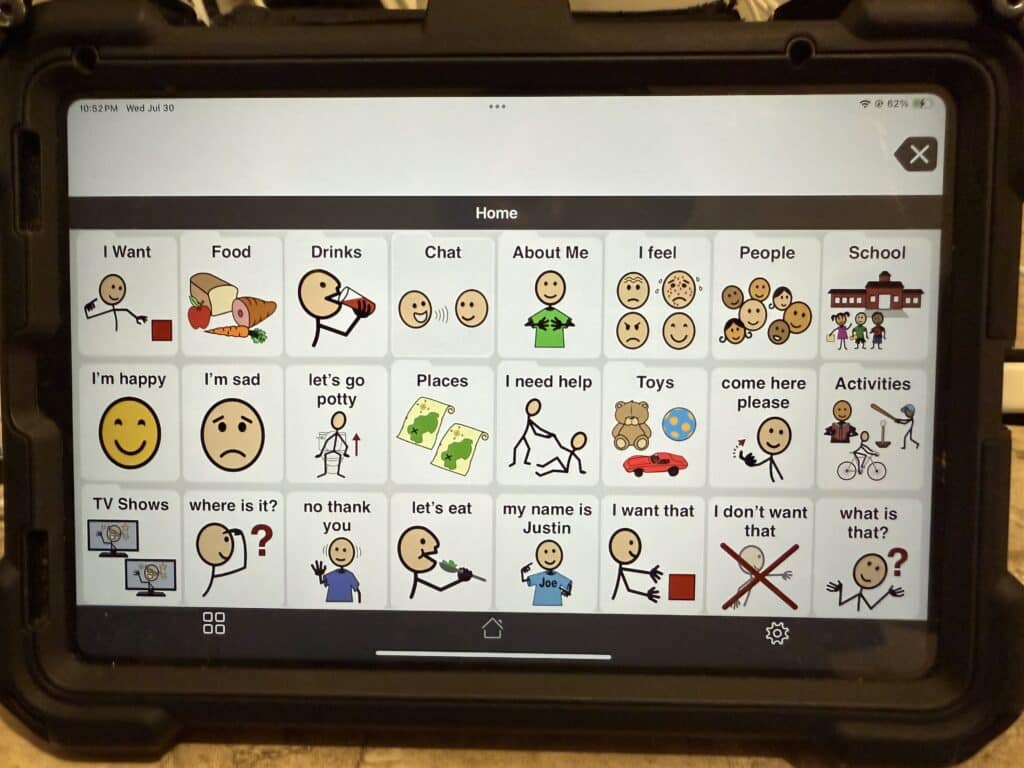
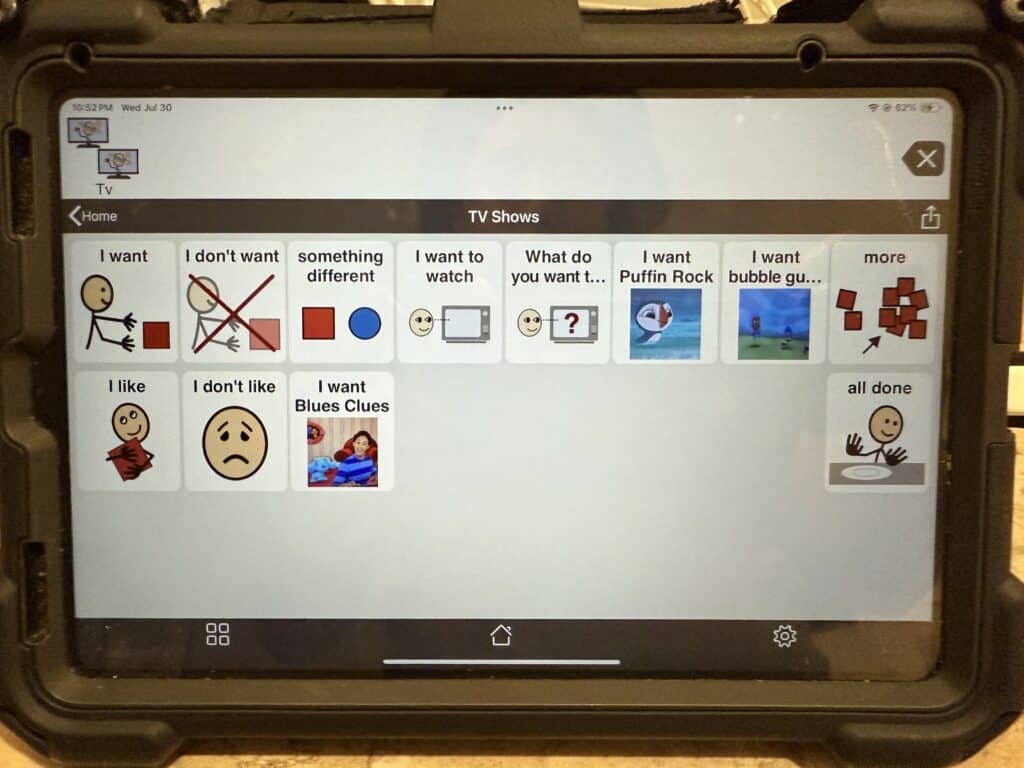
Bring Books to Life With Custom Communication Pages
To help her son with his reading, ableFamilies parent Nicole created a custom page on his device to go along with his favorite book, The Foot Book by Dr. Seuss.
Since he already loves the story, Nicole added many of the key words and phrases from the book onto his device. Now, when they read together, he can join in by tapping words and phrases as they come up. It makes story time so much more interactive and fun!
Nicole shared that while it took some time to organize the words, seeing her son’s excitement as he explored the finished page made it all worthwhile. This creative approach not only builds vocabulary and supports comprehension but also makes reading together even more fun.
If your child has a favorite book, this could be a fun way to bring it to life on their device and make reading time extra special.
Thank you to Nicole G. for sharing this creative idea with us!
The Power of Affirmations
Our kids might be little, but their emotions are huge. Through all the peaks and valleys of life, sometimes they just need a few words of encouragement. Have you ever thought about creating an affirmations page on your QuickTalker Freestyle?
This idea came from an ableFamilies parent, who added a special spot for affirmations under the Feelings section of her Talker.
“Our amazing kids need to know that they are kind, special, strong, smart, and all the things. So whenever my little man is struggling with something, we can click on the affirmations and remind him of all those things.”
We absolutely love this idea, and think it could be a wonderful addition to every household. If you’d like to set up something similar on your device, check out our speech app guides which are packed with tutorials and resources. Also, don’t forget about our CX Empowerment team! You can reach out to the SLP Empowerment Team to help you customize your QuickTalker Freestyle.