


Some school districts limit Wi-Fi access for students, which can prevent the QuickTalker Freestyle from updating or working the way it should. This guide will walk you through sending a request to your district’s IT department along with the information they need to say “yes.”
Send a Request to Your District
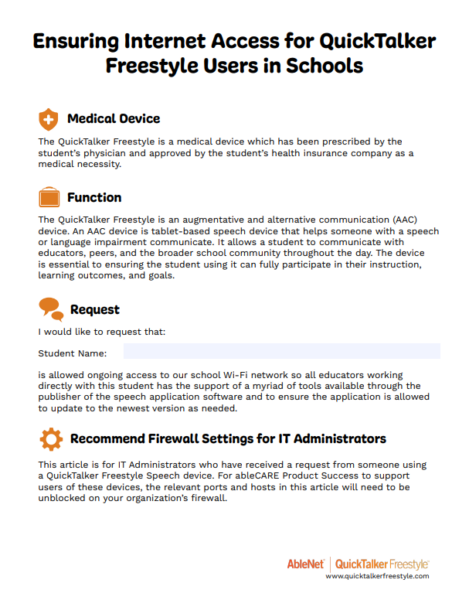
The PDF at the bottom of this guide explains that the QuickTalker Freestyle is a medical device, prescribed by the student’s physician and approved by their health insurance company. It also explains that the device is used only for speech.
- Under “Download This PDF,” select Download the Free Resource.
- Open the PDF, then write the student’s name on the “Student Name” line.
- In an email to your school district, ask the IT department to allow the student’s device ongoing access to the school’s Wi-Fi network and attach the PDF.
- If you’re a parent, caregiver, or outside SLP, you can also send this to the school’s speech therapist or speech-language pathologist, or Child Study Team, and they can direct the message to the school’s IT department.
Allow the Device Through the Firewall (For IT Administrators)
If you’re an IT administrator who received this request, ableCARE needs certain ports and hostnames unblocked so it can support the person using the device. The full list is in the PDF.
- Open the PDF, then find the “Port List” section.
- Allow every port, protocol, and hostname in that list through your organization’s firewall.
- If your firewall uses hostnames, allow outgoing connections to *.apple.com. This covers most of the Apple services in the list.
- If your firewall only uses IP addresses, allow outgoing connections to 17.0.0.0/8.
- Keep the device’s connection to the Apple Push Notification Service open on TCP ports 443, 80, 5223, and 2197. Allowing the whole 17.0.0.0/8 block works best, because the connection doesn’t always use the same IP address.
- If you can’t allow the entire block, allow the smaller IPv4 and IPv6 ranges listed under “Apple Push Notifications” in the PDF.
Download This PDF
Share this information with your district IT department and relevant school staff. The IT specific information is on the second page!
Still Stuck?
Our support teams are available Monday – Friday, 8 a.m. – 5 p.m. CST.
-
ableCARE Product Support
For technical issues related to QuickTalker Freestyle or assistive technology products.