


Your QuickTalker Freestyle may be managed by AbleNet, which affects how your apps get updated. Here’s how to check your device’s management status.
Instructions
There are two ways to check if a device is managed by AbleNet.
Step 1: Check VPN & Device Management
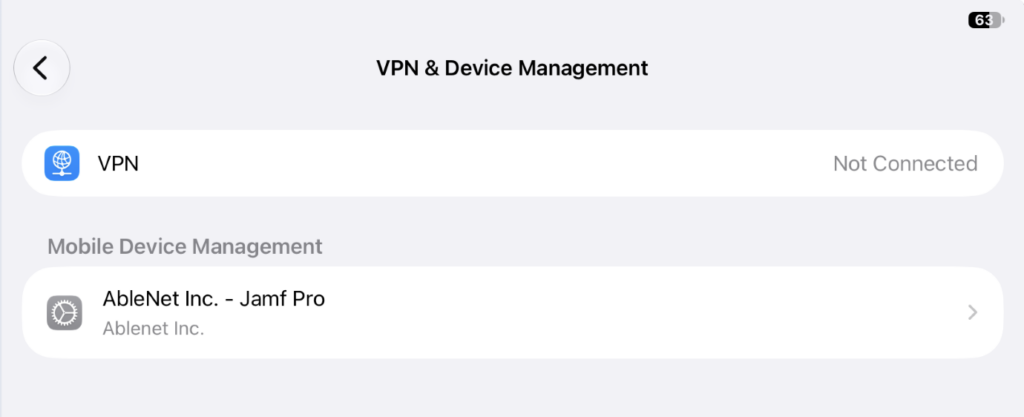
- Open Settings.
- Tap General.
- Tap VPN & Device Management.
- Under “Mobile Device Management,” look for “AbleNet Inc. – Jamf Pro”
- If you see this, then your device is managed by AbleNet, if you don’t see it, move on to “Check Your Apple Account” to confirm that your device is unmanaged.
Step 2: Check Your Apple Account
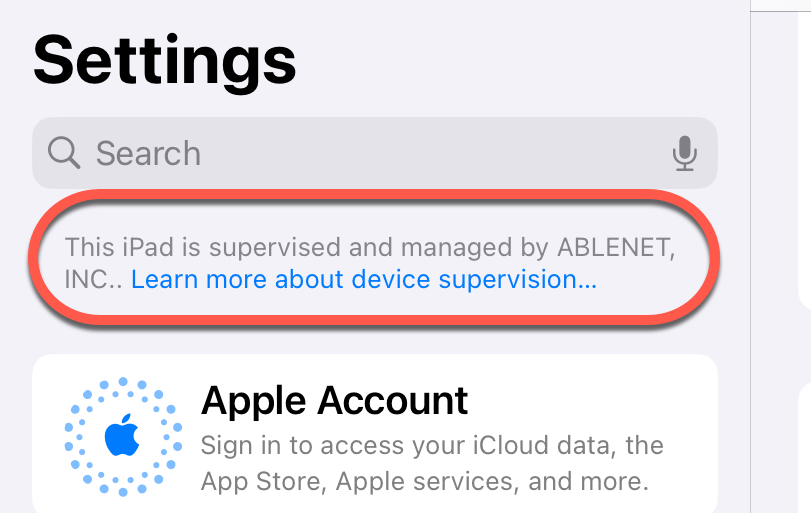
- Open Settings.
- Look above “Apple Account” for a message about device supervision.
- If you see a message that says “This iPad is supervised and managed by ABLENET INC.,” you have a managed device (see image below).
- If you don‘t see this message, then your device is not managed by AbleNet.